
확장 기능 관리
Extensions 모드에서는 Qt Creator 확장 기능 레지스트리나 기타 외부 저장소에서 확장 기능을 설치할 수 있을 뿐만 아니라, 이를 활성화 및 비활성화할 수도 있습니다.
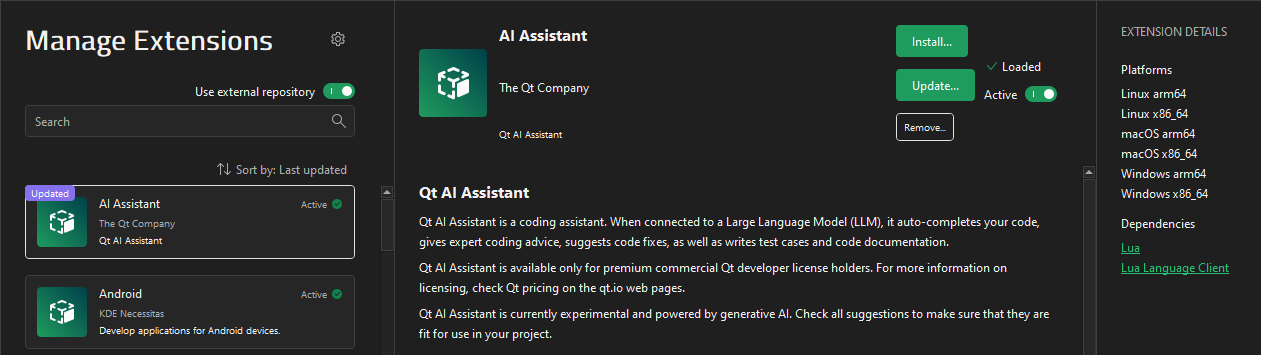
확장 프로그램을 설치하면 컴퓨터의 적절한 위치에 복사되고 사용을 위해 활성화됩니다. Qt Creator 은 확장 프로그램을 명시적으로 활성화하지 않고도 다른 확장 프로그램의 종속성으로 로드할 수도 있습니다.
확장 프로그램을 찾으려면 Search 에서 검색어를 입력하기 시작하세요.
확장 기능은 이름이나 업데이트 날짜별로 정렬할 수 있습니다.
외부 레지스트리에서 확장 기능을 설치하기 위한 URL을 추가하거나 설치 패키지에서 확장 기능을 설치하려면,  (Preferences)를 선택하십시오.
“확장 기능 설치 ” 및 “확장 기능 활성화”항목도 참조하십시오 .
Copyright © The Qt Company Ltd. and other contributors. Documentation contributions included herein are the copyrights of their respective owners. The documentation provided herein is licensed under the terms of the GNU Free Documentation License version 1.3 as published by the Free Software Foundation. Qt and respective logos are trademarks of The Qt Company Ltd in Finland and/or other countries worldwide. All other trademarks are property of their respective owners.
