
플러그인 설치
Qt Marketplace에는 Qt Creator 에 있는 플러그인 링크가 제공되며, 해당 플러그인은 무료로 또는 게시자가 정한 가격을 지불하고 다운로드하여 설치할 수 있습니다.
GitHub와 같은 다른 출처에서 플러그인을 설치할 수도 있습니다.
참고: 사용 중인 Qt Creator 버전에서 지원하는 플러그인만 설치할 수있습니다 .
플러그인을 설치하려면:
- About Plugins > ‘ Install Plugin ’로 이동합니다.
- ' Source ' 대화 상자에서 플러그인이 포함된 아카이브 또는 라이브러리의 경로를 입력합니다.
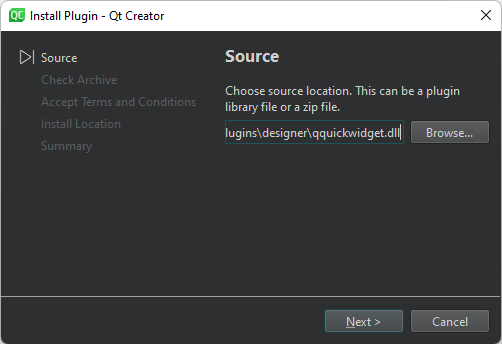
- ' Accept Terms and Connections ' 대화 상자에서 ' I accept terms and conditions'을 선택합니다.
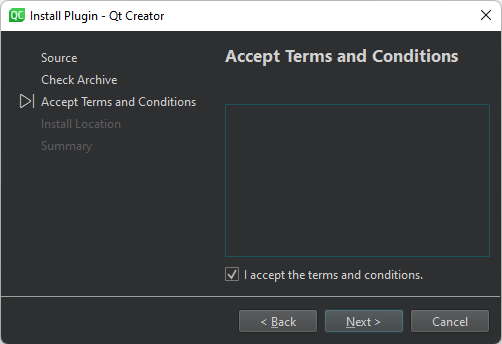
- ' Install Location ' 대화 상자에서 ' User plugins '을 선택하여 호환되는 모든 ' Qt Creator ' 인스턴스에서 현재 사용자가 플러그인을 사용할 수 있도록 하거나 Qt Creator installation 특정 Qt Creator 인스턴스의 모든 사용자가 플러그인을 사용할 수 있도록 하려면.
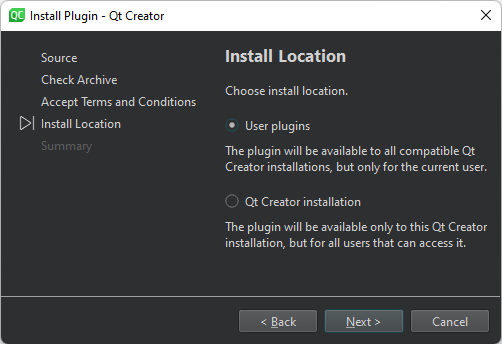
- ' Summary ' 대화 상자에서 ' Finish '를 선택하여 플러그인을 설치하십시오.
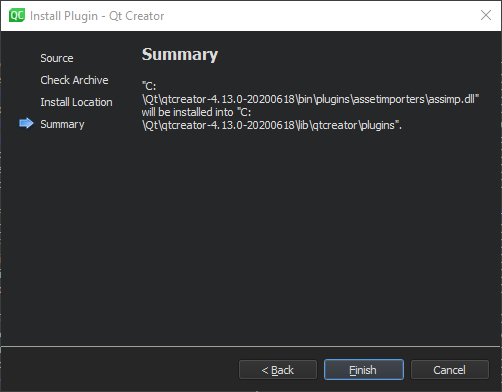
- ' Restart Now '를 선택하여 Qt Creator 를 다시 시작하고 플러그인을 로드하십시오.
'플러그인 활성화 및 비활성화', '설치', 'Qt 가져오기 및 설치'항목도 참조하십시오 .
Copyright © The Qt Company Ltd. and other contributors. Documentation contributions included herein are the copyrights of their respective owners. The documentation provided herein is licensed under the terms of the GNU Free Documentation License version 1.3 as published by the Free Software Foundation. Qt and respective logos are trademarks of The Qt Company Ltd in Finland and/or other countries worldwide. All other trademarks are property of their respective owners.
