
MCU 프로젝트 생성
참고: MCU 개발을 시작하기 전에 Help > About Plugins 로 이동하여 Qt for MCUs 플러그인이 활성화되어 있는지 확인하십시오.
MCU에서 실행할 수 있는 애플리케이션을 개발하기 위한 프로젝트를 생성합니다. 이 프로젝트는 Qt for MCUs 에서 지원하는 QML 및 Qt Quick Controls 타입의 일부를 가져옵니다. MCU용 애플리케이션 개발에 대한 자세한 내용은 Qt for MCUs를 참조하십시오.
애플리케이션을 생성하고 MCU 보드에서 실행하려면:
- File > New Project 로 이동합니다.
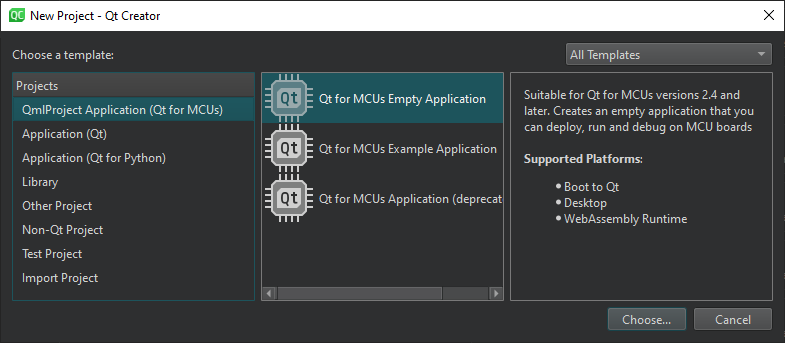
- 다음 항목을 선택합니다 QmlProject Application (Qt for MCUs) > Qt for MCUs Empty Application 또는 Qt for MCUs Example Application > Choose 을 선택하십시오.
- 마법사의 지침에 따라 프로젝트를 생성하십시오.
- Projects > Build & Run 를 선택한 다음, 애플리케이션을 빌드하고 키트에 명시된 MCU 보드에서 실행할 키트를 선택하십시오.
- Run Settings 로 이동하여 실행 설정을 지정하십시오. 일반적으로 기본 설정을 사용할 수 있습니다.
‘실행을 위한 프로젝트 구성’, ‘플러그인 활성화 및 비활성화’, ‘방법: MCU용 개발’, ‘프로젝트 마법사 사용’, ‘MCU용 개발’ 및 Qt for MCUs.
Copyright © The Qt Company Ltd. and other contributors. Documentation contributions included herein are the copyrights of their respective owners. The documentation provided herein is licensed under the terms of the GNU Free Documentation License version 1.3 as published by the Free Software Foundation. Qt and respective logos are trademarks of The Qt Company Ltd in Finland and/or other countries worldwide. All other trademarks are property of their respective owners.
