
현재 코드 블록 선택
코드 편집기에서 현재 C++ 코드 블록을 선택하려면 Ctrl+U를 누르십시오.
Ctrl+U를 한 번 더 누르면 선택 범위가 상위 블록까지 확장됩니다.
마지막 선택 작업을 취소하려면 Ctrl+Alt+Shift+U를 누르십시오.
스마트 블록 선택 켜기
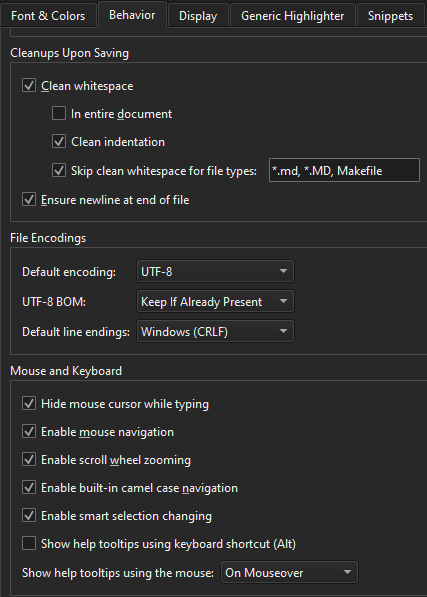
스마트 블록 선택을 활성화하려면 [ Preferences ] > [ Text Editor ] > [ Behavior ]로 이동하여 [ Enable smart selection changing]를 선택하십시오.
‘방법: 코드 편집’ 및 ‘코드 편집’항목도 참조하십시오 .
Copyright © The Qt Company Ltd. and other contributors. Documentation contributions included herein are the copyrights of their respective owners. The documentation provided herein is licensed under the terms of the GNU Free Documentation License version 1.3 as published by the Free Software Foundation. Qt and respective logos are trademarks of The Qt Company Ltd in Finland and/or other countries worldwide. All other trademarks are property of their respective owners.
