
Silver Searcher 활성화
컴퓨터에 Silver Searcher를 설치하면 Qt Creator 에서 Silver Searcher를 검색 엔진으로 사용할 수 있습니다.
참고: Silver Searcher를 사용하려면 Silver Searcher 플러그인을활성화해야 합니다 .
Silver Searcher를 사용하려면:
- The Silver Searcher 또는 GitHub에서 Silver Searcher를 다운로드하여 설치하십시오.
일부 플랫폼의 경우 소스 코드를 사용하여 실버 서처를 빌드해야 할 수도 있습니다.
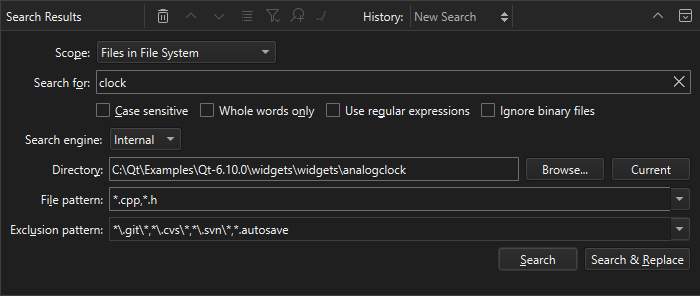
- 검색 시, ‘ Search engine ’에서 ‘ Silver Searcher ’를 선택하십시오.
Qt Creator 에서 Silver Searcher를 찾을 수 없다면, PATH 환경 변수에 설정된 경로와 다른 위치에 Silver Searcher를 설치했을 가능성이 있습니다.
Silver Searcher의 위치 설정
Qt Creator 에 Silver Searcher의 위치를 알려주려면:
- Preferences > Environment > System 로 이동합니다.
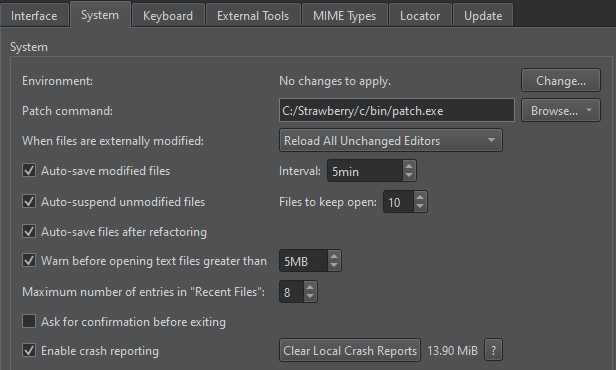
- Environment 에서 ‘ Change ’를 선택합니다.
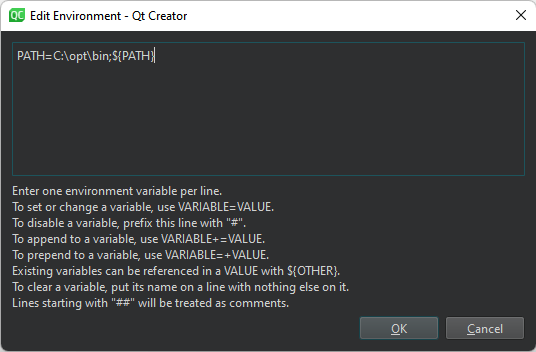
- Edit Environment 에서 Silver Searcher 실행 파일의 경로를 추가합니다:
PATH=</path/to/bin>:${PATH}
‘플러그인 활성화 및 비활성화’, ‘사용 방법: 검색’, ‘환경 설정 편집’항목도 참조하십시오 .
Copyright © The Qt Company Ltd. and other contributors. Documentation contributions included herein are the copyrights of their respective owners. The documentation provided herein is licensed under the terms of the GNU Free Documentation License version 1.3 as published by the Free Software Foundation. Qt and respective logos are trademarks of The Qt Company Ltd in Finland and/or other countries worldwide. All other trademarks are property of their respective owners.
