
크래시 보고서 활성화
Qt Creator Qt Creator 는 Google Breakpad를 사용하여 충돌에 대한 정보를 수집하고, 이를 처리하기 위해 Sentry로 전송합니다. Breakpad는 충돌한 프로세스의 메모리에서 사용자 민감 정보, URL 및 사용자가 에 신뢰하여 제공한 기타 콘텐츠를 포함한 임의의 내용을 캡처할 수 있습니다. 그러나 충돌 보고서는 오로지 소프트웨어 오류를 수정하는 목적으로만 사용됩니다.
크래시 보고를 활성화하려면:
- Preferences > Environment > System 로 이동합니다.
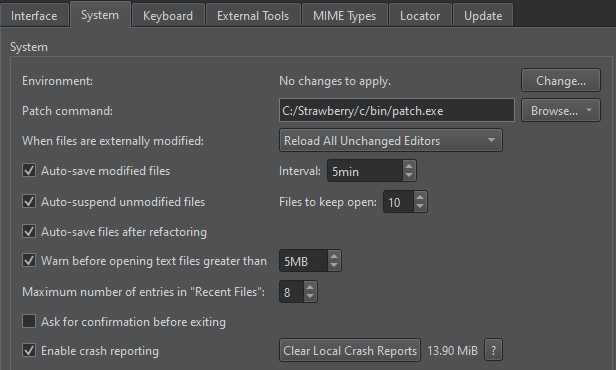
- Enable crash reporting 를 선택합니다.
충돌 보고서는 Sentry가 수신을 허용하는 파일 크기 제한을 초과하지 않는 경우 자동으로 전송됩니다. 보고서 전송 사실이나 전송 성공/실패 여부에 대해서는 알림이 제공되지 않습니다.
Breakpad 및 보안 정책에 대한 자세한 정보를 보려면 ‘ ? ’를 선택하세요.
크래시 보고서의 저장 위치
Qt Creator 은(는) 컴퓨터의 다음 디렉터리에 충돌 보고서를 저장합니다:
- Windows의 경우:
%APPDATA%\QtProject\qtcreator\crashpad_reports - Linux 및 macOS의 경우:
$HOME/.config/QtProject/qtcreator/crashpad_reports
참고: 크래시를 보고하는 가장 좋은방법은 해당 스택 트레이스를 붙여넣은 버그 보고서를 작성하는 것입니다.
참조: Qt에 문의하기.
Copyright © The Qt Company Ltd. and other contributors. Documentation contributions included herein are the copyrights of their respective owners. The documentation provided herein is licensed under the terms of the GNU Free Documentation License version 1.3 as published by the Free Software Foundation. Qt and respective logos are trademarks of The Qt Company Ltd in Finland and/or other countries worldwide. All other trademarks are property of their respective owners.
