
팝업 대신 정보 막대 사용
기본적으로 Qt Creator 는 사용자 상호작용이 필요한 메시지를 표시할 때 팝업 대화 상자를 사용합니다.
팝업 대신 배너 형식의 정보 표시줄을 사용하도록 선택할 수 있습니다.
정보 표시줄을 사용하려면:
- ‘ Preferences ’ > ‘ Environment ’ > ‘ Interface ’을 선택합니다.
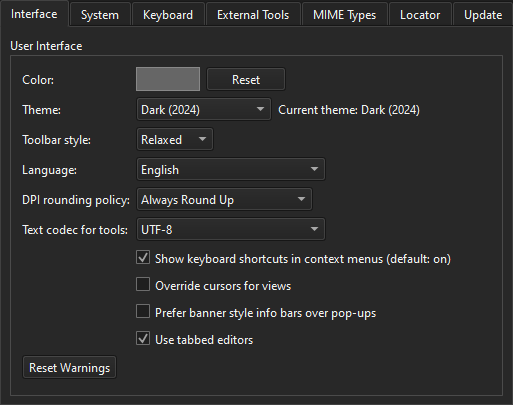
- Prefer banner style info bars over pop-ups 를 선택합니다.
‘방법: UI 조정’ 및 ‘UI 조정’항목도 참조하십시오 .
Copyright © The Qt Company Ltd. and other contributors. Documentation contributions included herein are the copyrights of their respective owners. The documentation provided herein is licensed under the terms of the GNU Free Documentation License version 1.3 as published by the Free Software Foundation. Qt and respective logos are trademarks of The Qt Company Ltd in Finland and/or other countries worldwide. All other trademarks are property of their respective owners.
