
마크다운 파일 편집
Markdown (.md) 파일을 열거나, File > New File 로 이동하여 General > Markdown File 를 선택해 새 파일을 생성하세요.
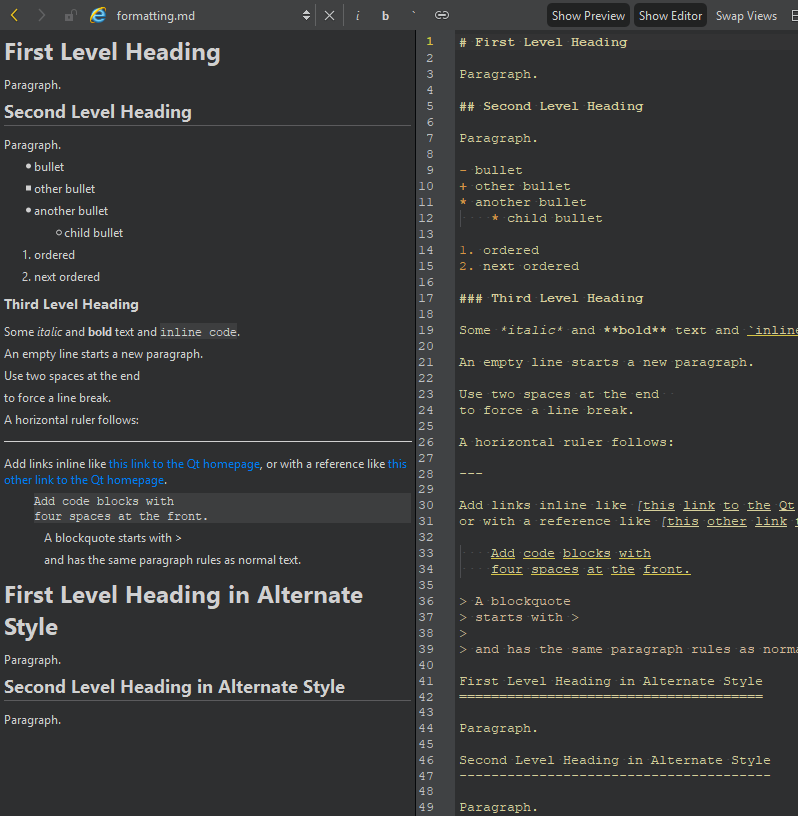
편집기에서 파일을 편집하면 미리보기에서 변경 사항을 확인할 수 있습니다.
보기를 숨기거나 표시하려면 ‘ Show Preview ’과 ‘ Show Editor ’을 선택하십시오. 보기의 위치를 바꾸려면 ‘ Swap Views ’을 선택하십시오.
텍스트 서식 지정
편집기 도구 모음의 버튼을 사용하여 텍스트를 기울임꼴(i), 굵은 글씨(b) 또는 인라인 코드(`)로 서식을 지정하고, 웹사이트( )로 연결되는 링크를 만들 수 있습니다.
줄과 열로 이동
줄 및 열 표시기는 현재 커서 위치에 대한 정보를 보여줍니다. 이를 선택하여 로케이터를 활성화한 다음, 줄 번호와 열 번호를 입력하여 해당 위치로 이동할 수 있습니다.
웹사이트 링크 따라가기
편집기에서 웹사이트 링크를 따라가려면:
- 커서를 링크 위에 놓습니다.
- 그런 다음 다음 중 하나를 수행하십시오:
- Ctrl+클릭 (macOS에서는 Cmd+클릭 )을 선택합니다.
- F2 키를 누릅니다.
- 컨텍스트 메뉴에서 ‘ Follow Symbol Under Cursor ’를 선택합니다.
Copyright © The Qt Company Ltd. and other contributors. Documentation contributions included herein are the copyrights of their respective owners. The documentation provided herein is licensed under the terms of the GNU Free Documentation License version 1.3 as published by the Free Software Foundation. Qt and respective logos are trademarks of The Qt Company Ltd in Finland and/or other countries worldwide. All other trademarks are property of their respective owners.
