
개요 보기
' Outline ' 보기를 사용하면 소스 파일 내의 정의된 타입 및 기타 심볼의 개요와 그 속성, 계층 구조를 확인할 수 있습니다.
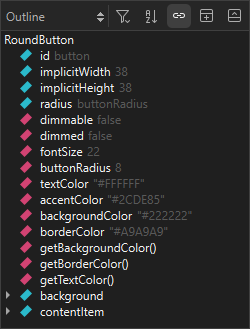
- 모든 바인딩의 전체 목록을 보려면 ‘
 ’(Filter Tree) > ‘ Show All Bindings ’을 선택하십시오.
 - 유형이나 심볼을 알파벳순으로 정렬하려면
 (Sort Alphabetically)을 선택하십시오.
 - 에디터에서 선택한 유형 또는 기호와의 동기화를 중지하려면 ‘
 ’ (Synchronize with Editor)을 해제하십시오.
Copyright © The Qt Company Ltd. and other contributors. Documentation contributions included herein are the copyrights of their respective owners. The documentation provided herein is licensed under the terms of the GNU Free Documentation License version 1.3 as published by the Free Software Foundation. Qt and respective logos are trademarks of The Qt Company Ltd in Finland and/or other countries worldwide. All other trademarks are property of their respective owners.
