
열린 문서 보기
' Open Documents ' 보기를 사용하여 현재 열려 있는 파일 목록을 확인하세요.
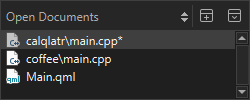
컨텍스트 메뉴를 사용하여 ‘ File ’ 메뉴 및 ‘파일 시스템’ 보에서도 사용할 수 있는 일부 기능을 이 보기에서 선택한 파일에 적용할 수 있습니다.
또한 다음 작업을 수행할 수 있습니다:
- 파일의 전체 경로 또는 파일 이름만 클립보드에 복사할 수 있습니다.
- 파일을 목록 상단에 고정하여 [ Close All]을 선택할 때 해당 파일이 계속 열려 있도록 할 수 있습니다.
- 목록에서 다음 및 이전 문서를 여는 키보드 단축키를 지정할 수 있습니다(OpenNextDocument 및 OpenPreviousDocument).
파일 열기 관련 기본 설정
파일 열기 및 열려 있는 파일 처리에 대한 환경 설정을 지정하려면 ‘ Preferences ’ > ‘ Environment ’ > ‘ System ’을 선택하십시오:
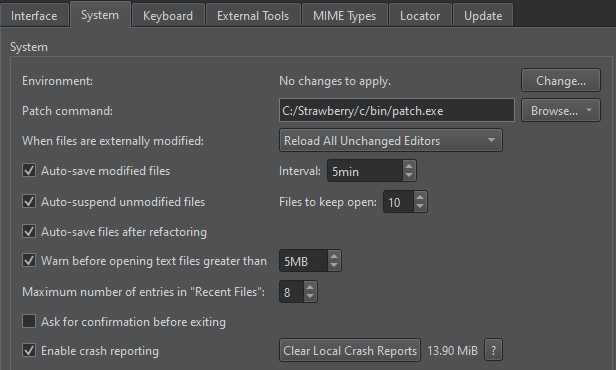
- ‘ When files are externally modified ’ 필드에서 외부에서 수정된 열려 있는 파일을 다시 불러올지 여부를 묻는 메시지를 표시할지 선택합니다. 예를 들어, 버전 관리 시스템에서 변경 사항을 가져올 때와 같은 경우입니다.
- ' Auto-save modified files '을 선택하면 ' Interval ' 필드에 지정된 간격으로 변경된 파일이 자동으로 저장됩니다.
- 리팩토링된 파일을 자동으로 저장하려면 ' Auto-save files after refactoring ' 확인란을 선택하십시오.
- Auto-suspend unmodified files 확인란을 선택하면 장시간 활동이 없을 때 열려 있는 파일의 리소스를 자동으로 해제합니다. 파일은 여전히 Open Documents 보기에 나열됩니다. Files to keep open 필드에서 메모리에 유지해야 할 파일의 최소 수를 설정합니다.
- ‘ Warn before opening text files greater than ’을 선택하면 대용량 텍스트 파일을 열 때 경고 메시지가 표시됩니다.
- ' Maximum number of entries in "Recent Files" ' 필드에서 ' File > Recent Files'에 나열될 최근에 열린 파일의 수를 설정합니다.
‘빠른 수정 적용’, ‘키보드 단축키 할당’, ‘심볼 찾기’ 및 ‘심볼 이름 변경’항목도 참조하십시오 .
Copyright © The Qt Company Ltd. and other contributors. Documentation contributions included herein are the copyrights of their respective owners. The documentation provided herein is licensed under the terms of the GNU Free Documentation License version 1.3 as published by the Free Software Foundation. Qt and respective logos are trademarks of The Qt Company Ltd in Finland and/or other countries worldwide. All other trademarks are property of their respective owners.
