
Valgrind Callgrind
Valgrind 환경 설정을 모든 프로젝트에 대해 전역적으로 설정하거나, 프로젝트별 실행 설정에서 각 프로젝트마다 별도로 설정할 수 있습니다.
Valgrind에 대한 전역 기본 설정을 지정하려면, ‘ Preferences ’ > ‘ Analyzer ’ > ‘ Valgrind ’를 선택하십시오. ‘ Callgrind Profiling Options ’에서 Callgrind 기본 설정을 지정하십시오.
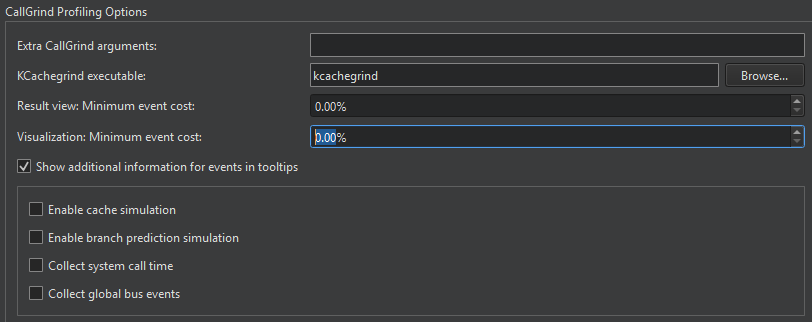
' KCachegrind executable ' 필드에 실행할 KCachegrind 실행 파일의 경로를 입력하십시오.
Extra Callgrind arguments 필드에서 실행 파일을 실행하기 위한 추가 인수를 지정하십시오.
Result view: Minimum event cost 및 Visualization: Minimum event cost 필드에서 프로파일러가 표시하고 시각화하는 결과의 양을 제한하여 프로파일러 성능을 높일 수 있습니다.
툴팁에 이벤트에 대한 추가 정보를 표시하려면 Show additional information for events in tooltips 을 선택하십시오.
시스템 호출 시간에 대한 정보를 수집하려면 ‘ Collect system call time ’를 선택하십시오. ‘ Ge ’ 이벤트 유형으로 실행된 전역 버스 이벤트의 수를 수집하려면 ‘ Collect global bus events ’를 선택하십시오.
전체 캐시 시뮬레이션 활성화
기본적으로 명령어 읽기 액세스(Ir)만 집계됩니다. 캐시를 완전히 시뮬레이션하려면 ‘ Enable cache simulation ’를 선택하십시오. 이렇게 하면 다음과 같은 추가 이벤트 카운터가 활성화됩니다:
- 명령어 읽기 시 캐시 미스(I1mr/I2mr)
- 데이터 읽기 액세스(Dr) 및 관련 캐시 미스(D1mr/D2mr)
- 데이터 쓰기 액세스(Dw) 및 관련 캐시 미스(D1mw/D2mw)
분기 예측 시뮬레이션 활성화
다음 추가 이벤트 카운터를 활성화하려면 ‘ Enable branch prediction simulation ’를 선택하십시오:
- 실행된 조건부 분기 횟수 및 관련 예측기 미스(Bc/Bcm)
- 실행된 간접 점프 및 관련 점프 주소 예측기 미스(Bi/Bim)
참조: Memcheck를 사용하여 메모리 누수 감지, 뷰 분리, 함수 실행 프로파일링, 외부 애플리케이션에서 Valgrind 도구 실행, 프로젝트에 대한 Valgrind 설정 지정, Valgrind Memcheck.
Copyright © The Qt Company Ltd. and other contributors. Documentation contributions included herein are the copyrights of their respective owners. The documentation provided herein is licensed under the terms of the GNU Free Documentation License version 1.3 as published by the Free Software Foundation. Qt and respective logos are trademarks of The Qt Company Ltd in Finland and/or other countries worldwide. All other trademarks are property of their respective owners.
