
모듈 가져오기
프로젝트를 생성하면 마법사가 해당 프로젝트에서 일반적으로 필요한 Qt 모듈을 가져옵니다. 예를 들어, Qt Quick 애플리케이션 프로젝트에는 기본 컴포넌트와 UI 컨트롤이 포함되어 있습니다.
사용 가능한 모듈 목록을 보려면 ‘  ’를 선택하십시오. 가장 자주 사용되는 모듈은 알파벳 순서대로 목록 상단에 배치됩니다. ‘ Search ’ 필드에 검색 조건을 입력하여 컴포넌트와 모듈을 검색할 수 있습니다.
모듈을 선택하면 해당 모듈이 ‘ Components ’에 추가됩니다.
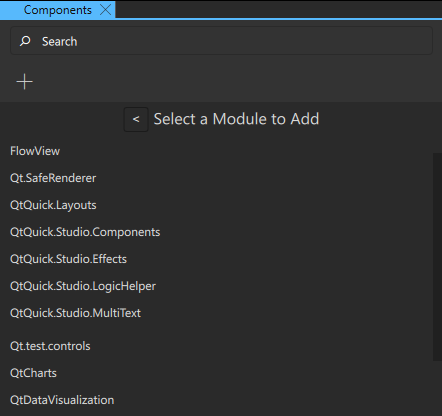
이렇게 하면 ‘ Code ’ 보기 또는 ‘ Edit ’ 모드에서 확인할 수 있는 컴포넌트 코드에 임포트 문이 추가됩니다. 예를 들어, ‘ QtQuick.Controls ’ 모듈을 추가하면 코드에 다음과 같은 임포트 문이 추가됩니다: import QtQuick.Controls.
추가된 컴포넌트와 모듈은 UI와 함께 최종 애플리케이션 패키지에 포함되므로, 프로젝트에서 사용하지 않는 항목은 ' Remove Module '를 선택하여 제거하는 것이 좋습니다.
‘UI 구성 요소 사용 방법’, ‘Qt Quick UI 디자인’ 및 ‘ Qt Quick UI 디자인’도 참조하십시오 .
Copyright © The Qt Company Ltd. and other contributors. Documentation contributions included herein are the copyrights of their respective owners. The documentation provided herein is licensed under the terms of the GNU Free Documentation License version 1.3 as published by the Free Software Foundation. Qt and respective logos are trademarks of The Qt Company Ltd in Finland and/or other countries worldwide. All other trademarks are property of their respective owners.
