
自定义构建流程
要配置项目的构建、部署和运行方式,请转至Preferences >Build & Run >General 。
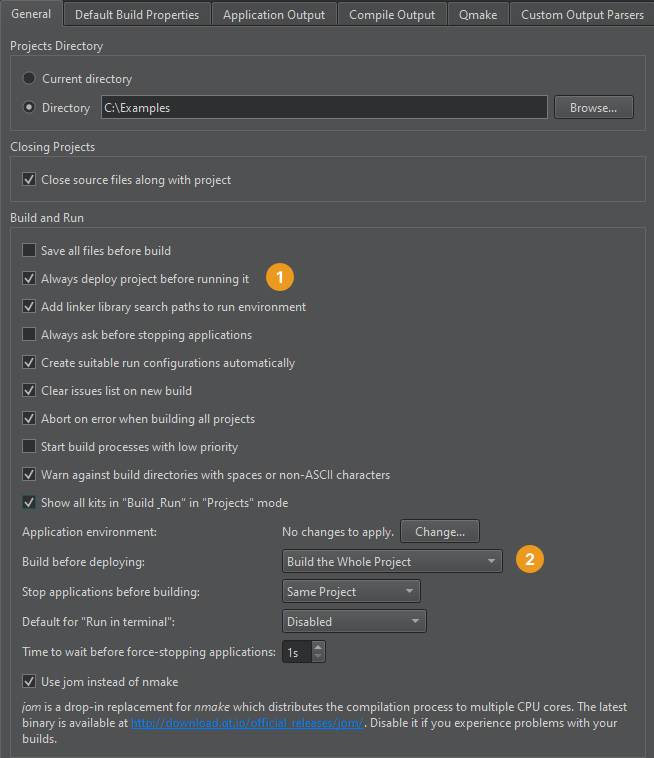
默认情况下,Always deploy project before running it (1)和Build the Whole Project (2)已被选中。因此,当您选择 (Run )时,Qt Creator 会检查项目文件中的更改,并在必要时构建和部署项目。
若要不进行构建直接部署应用程序,或仅构建您想要运行的应用程序,请在Build before deploying 中选择相应的选项。
在构建前停止应用程序
默认情况下,在重建项目之前,项目中包含的应用程序会被停止。
若要仅停止当前应用程序、同一构建目录中的应用程序、所有应用程序或不停止任何应用程序,请在“Stop applications before building ”中选择相应的选项。
使用 jom
在 Windows 上,您可以使用jom 代替nmake 来构建项目,从而将编译过程分配到多个 CPU 核心上。
要使用jom :
如果构建失败,请取消选中该复选框。
Copyright © The Qt Company Ltd. and other contributors. Documentation contributions included herein are the copyrights of their respective owners. The documentation provided herein is licensed under the terms of the GNU Free Documentation License version 1.3 as published by the Free Software Foundation. Qt and respective logos are trademarks of The Qt Company Ltd in Finland and/or other countries worldwide. All other trademarks are property of their respective owners.
