
CMake 预设
CMakePresets.json 提供了适用于整个项目的构建选项,而“CMakeUserPresets.json ”则提供了适用于本地构建的选项。
请按照CMake: cmake-presets(7)中描述的格式创建预设文件,并将它们存储在项目的根目录下。随后,您可以在“项目”视图中看到这些预设。
Qt Creator 支持最高至第 10 版(在 CMake 3.31 中引入)的配置、构建和测试预设,但不会强制执行版本检查。如果存在第 10 版的字段,它会读取并使用所有字段。
您可以在首次打开项目时导入预设,前提是项目中不存在 `CMakeLists.txt.user ` 文件,或者您已禁用项目中的所有套件。
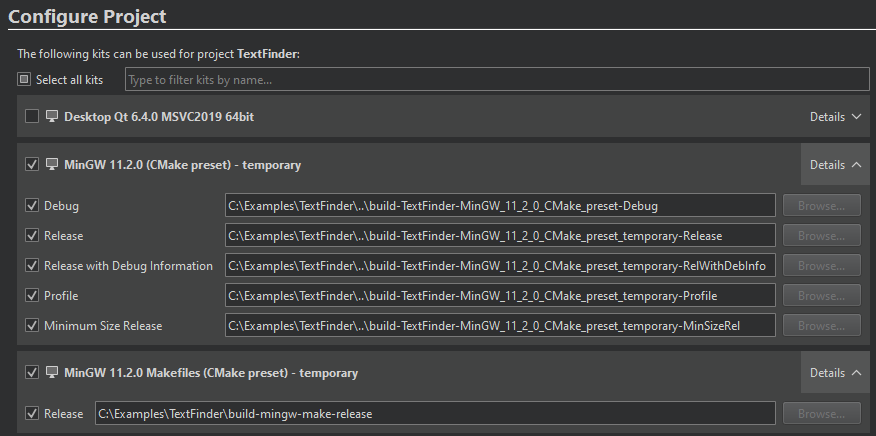
您可以在“Initial Configuration ”字段及其下方的环境配置字段中查看这些预设。
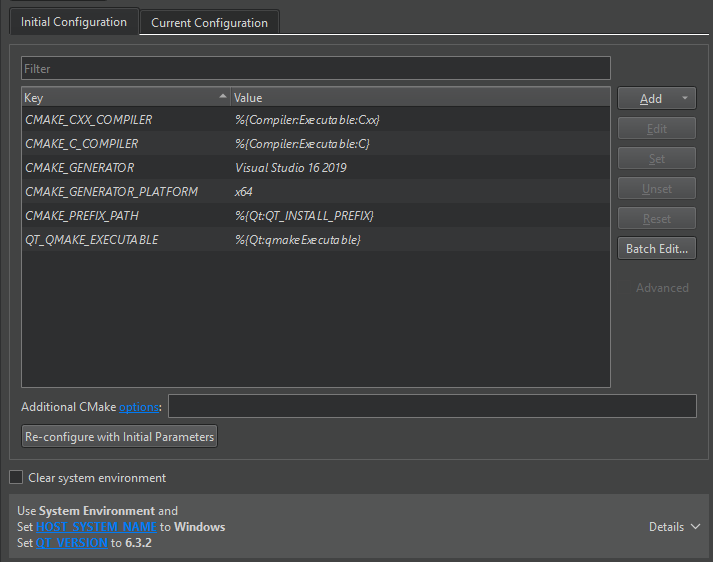
Qt Creator 会监视“CMakePresets.json ”预设文件是否有更改。要手动更新文件中的更改,请转到“Build ”,选择“Reload CMake Presets ”,然后选择要加载的预设文件。
配置预设
以下配置预设会指示 CMake 使用该平台上的默认生成器,并为所有构建类型指定构建目录。NOT_COMMON_VALUE 会显示在Initial Parameters 中,AN_ENVIRONMENT_FLAG 则显示在环境配置字段中。
{
  "version": 1,
  "configurePresets": [
    {
      "name": "preset",
      "displayName": "preset",
      "binaryDir": "${sourceDir}/build/preset",
      "cacheVariables": {
        "NOT_COMMON_VALUE": "NOT_COMMON_VALUE"
        },
      "environment": {
        "AN_ENVIRONMENT_FLAG": "1"
        }
      },
      "vendor": {
        "qt.io/QtCreator/1.0": {
           "AskBeforePresetsReload": false,
           "AskReConfigureInitialParams": false,
           "AutorunCMake": false,
           "PackageManagerAutoSetup": false,
           "ShowAdvancedOptionsByDefault": true,
           "ShowSourceSubFolders": false,
           "UseJunctionsForSourceAndBuildDirectories": true
           }
      }
  ]
}有关“vendor ”部分中 CMake 项目设置的更多信息,请参阅CMakeQt Creator 供应商预设。
MinGW 示例
以下示例配置了一个 Qt 项目,其中:
- MinGW 编译器
- 构建目录 –
<sourceDir>/build-release - 构建类型 –
CMAKE_BUILD_TYPE,作为Release - 生成器——MinGW Makefiles
- CMake 可执行文件的路径
- 通过以下方式指定的 Qt 安装路径
CMAKE_PREFIX_PATH - 适用于 MinGW 11.2.0 64 位版的 GNU gdb 11.2.0 调试器
{
  "version": 1,
  "configurePresets": [
    {
      "name": "mingw",
      "displayName": "MinGW 11.2.0",
      "generator": "MinGW Makefiles",
      "binaryDir": "${sourceDir}/build-release",
      "cmakeExecutable": "C:/Qt/Tools/CMake_64/bin/cmake.exe",
      "cacheVariables": {
        "CMAKE_BUILD_TYPE": "Release",
        "CMAKE_PREFIX_PATH": "C:/Qt/6.4.0/mingw_64"
      },
      "environment": {
        "PATH": "C:/Qt/Tools/mingw1120_64/bin;$penv{PATH}"
      },
      "vendor": {
        "qt.io/QtCreator/1.0": {
          "debugger": {
            "DisplayName": "GNU gdb 11.2.0 for MinGW 11.2.0 64-bit",
            "Abis": ["x86-windows-msys-pe-64bit"],
            "Binary": "C:/Qt/Tools/mingw1120_64/bin/gdb.exe",
            "EngineType": 1,
            "Version": "11.2.0"
          }
        }
      }
  ]
}
为了在 Windows 上加快处理速度,请在cacheVariables 部分指定CMAKE_C_COMPILER 和CMAKE_CXX_COMPILER 。
有关debugger 中某些首选项的可能值,请参阅CMakeQt Creator 供应商预设。
Ninja 生成器示例
以下配置和构建预设将 Ninja Multi-Config 设为生成器,添加了“Debug ”和“Release ”构建步骤,并将“ninja.exe ”的路径作为CMAKE_MAKE_PROGRAM 变量的值:
{
  "version": 2,
  "configurePresets": [
    {
      "name": "ninja-nmc",
      "displayName": "Ninja Multi-Config MinGW",
      "generator": "Ninja Multi-Config",
      "binaryDir": "${sourceDir}/build",
      "cacheVariables": {
        "CMAKE_CONFIGURATION_TYPES": "Debug;Release",
        "CMAKE_PREFIX_PATH": "C:/Qt/6.4.0/mingw_64",
        "CMAKE_MAKE_PROGRAM": "C:/Qt/Tools/Ninja/ninja.exe"
      },
      "environment": {
        "PATH": "c:/Qt/Tools/mingw1120_64/bin;$penv{PATH}"
      }
    }
  ],
  "buildPresets": [
    {
      "name": "release",
      "displayName": "Ninja Release",
      "configurePreset": "ninja-nmc",
      "configuration": "Release"
    },
    {
      "name": "debug",
      "displayName": "Ninja Debug",
      "configurePreset": "ninja-nmc",
      "configuration": "Debug"
    }
  ]
}
此示例假设 CMake 可执行文件的路径已设置在Preferences >CMake >Tools 中。
MSVC 示例
在使用 MSVC 编译器配合 NMAKE Makefile、Ninja 或 Ninja Multi-Config 生成器时,您可以将architecture 和toolset 字段设置为external 策略。这允许Qt Creator 在调用 CMake 之前配置 Visual C++ 环境。
例如:
"generator": "Ninja Multi-Config",
"toolset": {
  "value": "v142,host=x64",
  "strategy": "external"
},
"architecture": {
  "value": "x64",
  "strategy": "external"
},
如果您在非VS生成器中使用MSVC编译器,并且在PATH 中包含多个编译器,则可能还需要在cacheVariables 或environmentVariables 中指定要使用的编译器:
"generator": "Ninja Multi-Config",
"toolset": {
  "value": "v142,host=x64",
  "strategy": "external"
},
"architecture": {
  "value": "x64",
  "strategy": "external"
},
"cacheVariables": {
  "CMAKE_C_COMPILER": "cl.exe",
  "CMAKE_CXX_COMPILER": "cl.exe"
}
交叉编译示例
以下示例配置了一个 Qt 项目,用于在 macOS 上进行面向 Windows 的交叉编译,并在 macOS 上通过wine 模拟器运行:
- 生成器 – Ninja
- 构建目录 –
<sourceDir>/build-release - LLVM/MinGW 工具链
- 配置类型 –
CMAKE_BUILD_TYPE作为Release - LLDB 18.1.6 调试器
wine模拟器
{
  "version": 4,
  "configurePresets": [
    {
      "name": "llvm-mingw",
      "displayName": "LLVM-MinGW 18.1.6",
      "generator": "Ninja",
      "binaryDir": "${sourceDir}/build-release",
      "toolchainFile": "llvm-mingw.cmake",
      "cacheVariables": {
        "CMAKE_BUILD_TYPE": "Release",
        "CMAKE_CROSSCOMPILING_EMULATOR": "/opt/homebrew/bin/wine"
      },
      "vendor": {
        "qt.io/QtCreator/1.0": {
          "debugger": {
            "DisplayName": "LLDB 18.1.6 (CMake Preset)",
            "Abis": ["x86-darwin-generic-mach_o-64bit", "arm-darwin-generic-mach_o-64bit"],
            "Binary": "/Users/jdoe/llvm-mingw/bin/lldb",
            "EngineType": 256,
            "Version": "18.1.6"
          }
        }
      }
    }
  ]
}
使用条件
如果符合condition 的条件,则使用以下配置预设。也就是说,如果hostSystemName 等于Linux ,则使用linux 预设;如果等于Windows ,则使用windows 预设。
{
  "version": 3,
  "configurePresets": [
    {
      "name": "linux",
      "displayName": "Linux GCC",
      "binaryDir": "${sourceDir}/build",
      "cacheVariables": {
        "CMAKE_PREFIX_PATH": "$env{HOME}/Qt/6.4.0/gcc_64"
      },
      "condition": {
        "type": "equals",
        "lhs": "${hostSystemName}",
        "rhs": "Linux"
      }
    },
    {
      "name": "windows",
      "displayName": "Windows MSVC",
      "binaryDir": "${sourceDir}/build",
      "cacheVariables": {
        "CMAKE_PREFIX_PATH": "$env{SYSTEMDRIVE}/Qt/6.4.0/msvc2019_64"
      },
      "condition": {
        "type": "equals",
        "lhs": "${hostSystemName}",
        "rhs": "Windows"
      }
    }
  ]
}
测试预设
以下测试预设会指示 CMake 在测试失败时停止测试执行并打印测试程序的输出结果,同时若无法找到测试,则显示错误信息。
{
  "version": 3,
  "testPresets": [
  {
    "name": "default",
    "configurePreset": "default",
    "output": {"outputOnFailure": true},
    "execution": {"noTestsAction": "error", "stopOnFailure": true}
    }
  ],
}
另请参阅 《如何使用 CMake 进行构建》、《 使用 CMake 构建项目》、《CMake》、《CMakeQt Creator 供应商预设》以及《SDK 工具》。
Copyright © The Qt Company Ltd. and other contributors. Documentation contributions included herein are the copyrights of their respective owners. The documentation provided herein is licensed under the terms of the GNU Free Documentation License version 1.3 as published by the Free Software Foundation. Qt and respective logos are trademarks of The Qt Company Ltd in Finland and/or other countries worldwide. All other trademarks are property of their respective owners.
