
添加自定义输出解析器
自定义输出解析器会扫描命令行输出,查找您指定的错误和警告模式,并为发现的模式在“问题”中创建条目。
要添加或更改自定义输出解析器,请选择“Preferences ” > “Build & Run ” > “Custom Output Parsers ”。
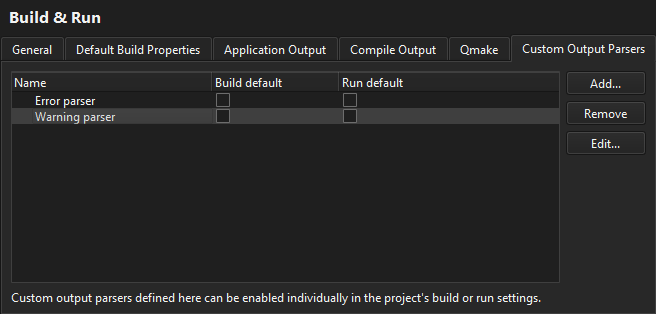
要编辑自定义输出解析器的设置,请在列表中选中该解析器,然后选择“Edit ”。
若要默认对所有构建或运行配置使用自定义输出解析器,请选择“Build default ”或“Run default ”。
要删除所选解析器,请选择“Remove ”。
要将所选解析器导出到 JSON 文件中,请选择“Export ”。
要从 JSON 文件导入一个或多个解析器,请选择“Import ”。
设置自定义解析器首选项
您可以根据在“Error ”和“Warning ”选项卡中指定的设置,分别捕获错误和警告。
要创建自定义输出解析器:
- 选择“Preferences ” > “Build & Run ” > “Custom Output Parsers ” > “Add ”。
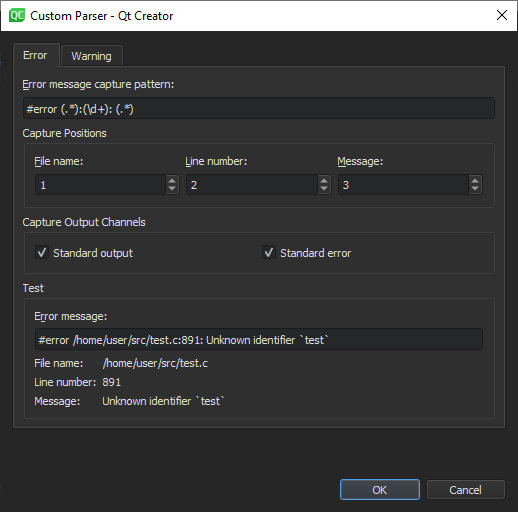
- 在“Error message capture pattern ”字段中,指定一个正则表达式来定义什么是错误。自定义解析器会逐行将编译输出与正则表达式进行匹配,并在“Issues”中显示错误。创建包含文件名、行号和错误消息的正则表达式组。
- 在“Capture Positions ”字段中,将正则表达式组映射到“File name ”、“Line number ”和“Message ”。
- 在“Capture Output Channels ”字段中,指定应捕获来自标准输出、标准错误还是这两个通道的消息。
- 在“Test ”组中,您可以测试在使用当前设置时,“Error message ”字段中输入的消息如何被匹配。
- 选择“OK ”将该解析器添加到解析器列表中,然后返回“Custom Output Parsers ”选项卡。
- 双击解析器名称,将其更改为比默认值更具描述性的名称。
另请参阅 “激活自定义输出解析器”、“配置项目以进行构建”和“配置项目以进行运行”。
Copyright © The Qt Company Ltd. and other contributors. Documentation contributions included herein are the copyrights of their respective owners. The documentation provided herein is licensed under the terms of the GNU Free Documentation License version 1.3 as published by the Free Software Foundation. Qt and respective logos are trademarks of The Qt Company Ltd in Finland and/or other countries worldwide. All other trademarks are property of their respective owners.
