
启用自定义输出解析器
您可以在Build Settings 和Run Settings 的“Custom Output Parsers ”部分,以及自定义编译器设置中启用自定义输出解析器。
要启用自定义输出解析器,请转至Projects >Build Settings 或Run Settings :
- 在“Custom Output Parsers ”部分,选择“Details ”。
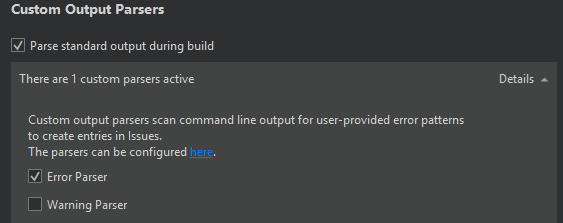
- 选择自定义解析器,以在构建或运行项目时启用它们。
选择“Parse standard output during build ”,使输出解析器除了在stderr 上查找诊断信息外,还会在stdout 上查找。
另请参阅 “添加自定义编译器”、“添加自定义输出解析器”、“配置项目以进行构建”和“配置项目以进行运行”。
Copyright © The Qt Company Ltd. and other contributors. Documentation contributions included herein are the copyrights of their respective owners. The documentation provided herein is licensed under the terms of the GNU Free Documentation License version 1.3 as published by the Free Software Foundation. Qt and respective logos are trademarks of The Qt Company Ltd in Finland and/or other countries worldwide. All other trademarks are property of their respective owners.
