
添加 Java 语言服务器
要添加用于开发 Android 应用程序的 Java 语言服务器:
- 转至“Preferences ” > “Language Client ” > “Add ” > “Java Language Server ”以添加 Java 语言服务器。
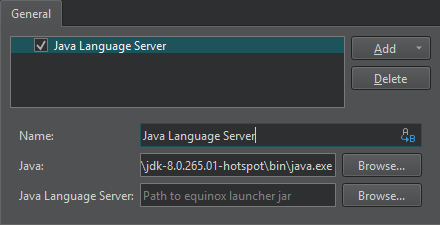
- 在Name 中,为语言服务器输入名称。选择“
 ”(Variables )以使用变量作为服务器名称。
 - 在“Java ”中,输入 Java 可执行文件的路径。
- 在“Java Language Server ”中,输入 Java 语言服务器配置文件(
.jar)的路径。您可以从Eclipse 下载中心下载 Java 语言服务器。
另请参阅 《操作指南:管理语言服务器》、《使用Qt Creator 变量》以及《管理语言服务器》。
Copyright © The Qt Company Ltd. and other contributors. Documentation contributions included herein are the copyrights of their respective owners. The documentation provided herein is licensed under the terms of the GNU Free Documentation License version 1.3 as published by the Free Software Foundation. Qt and respective logos are trademarks of The Qt Company Ltd in Finland and/or other countries worldwide. All other trademarks are property of their respective owners.
