
添加通用语言服务器
要添加一个通用的 StdIO 语言服务器:
- 转至“Preferences ” > “Language Client ” > “Add ” > “Generic StdIO Language Server ”以添加通用语言服务器。
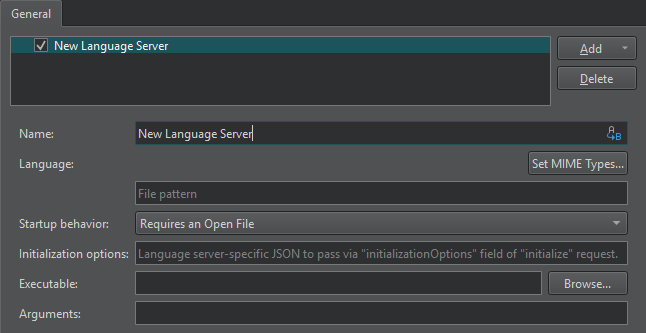
- 在“Name ”字段中,输入语言服务器的名称。选择“
 ”(Variables )以使用变量作为服务器名称。有关详细信息,请参阅“使用Qt Creator 变量”。
 - 在“Language ”中,选择“Set MIME Types ”以指定要发送至语言服务器的文件的 MIME 类型。在下方的字段中,您可以输入文件模式来扩展 MIME 类型,各模式之间用分号分隔。
- 在“Startup behavior ”中,选择语言服务器是在“Qt Creator ”启动时启动,还是在打开具有匹配 MIME 类型的项目或文件时启动。“General Messages”显示有关与语言服务器连接的信息。
- 在“Initialization options ”中,您可以添加语言服务器专用的 JSON 属性,将其传递给
initialize请求。 - 在“Executable ”中,输入语言服务器可执行文件的路径。
- 在“Arguments ”中,输入任何必需的命令行参数。选择“Variables ”以将变量用作参数。
另请参阅 《操作指南:管理语言服务器》和《管理语言服务器》。
Copyright © The Qt Company Ltd. and other contributors. Documentation contributions included herein are the copyrights of their respective owners. The documentation provided herein is licensed under the terms of the GNU Free Documentation License version 1.3 as published by the Free Software Foundation. Qt and respective logos are trademarks of The Qt Company Ltd in Finland and/or other countries worldwide. All other trademarks are property of their respective owners.
