
向 Android 软件包添加外部库
Qt Creator 会自动检测应用程序使用的 Qt 库,并将它们添加为依赖项。
若要将外部库复制到应用程序的库文件夹中,并在启动时加载它们:
- 转到“Projects ” > “Build Settings ” > “Build Android APK ”,然后选择“Details ”。
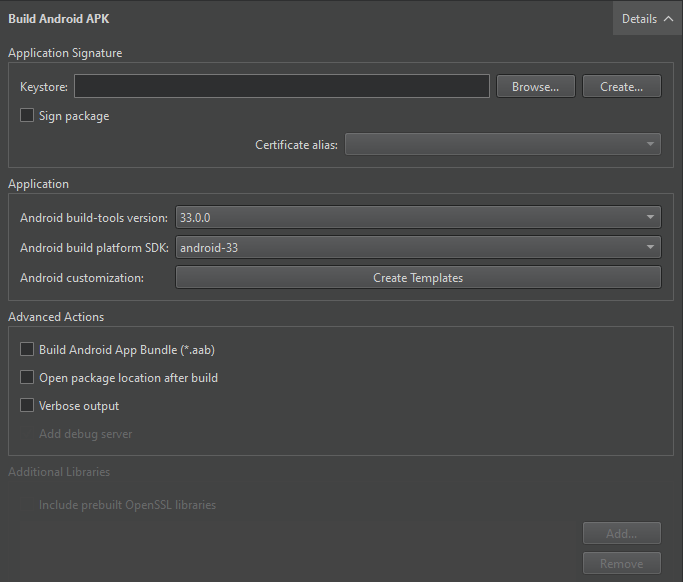
- 在“Additional Libraries ”中,选择要添加的库。
添加 OpenSSL 库
要添加 OpenSSL 库,请在“Additional Libraries ”组中选择“Include prebuilt OpenSSL libraries ”。
这将添加您在“Preferences >SDKs >Android OpenSSL Settings ”中指定的 OpenSSL 包含项目。此方法适用于 qmake 和 CMake 项目。
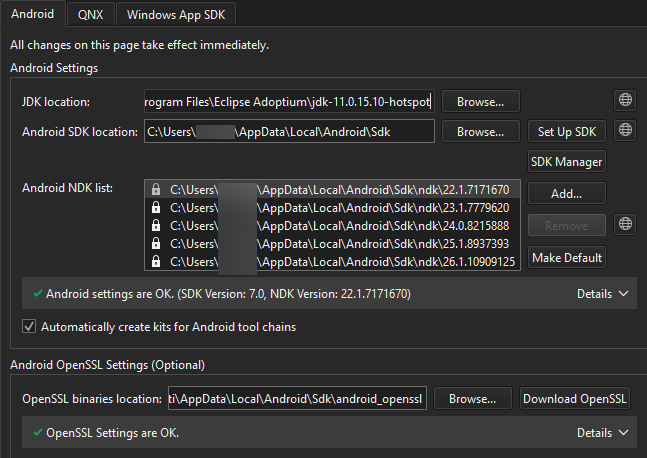
您还可以手动将所需libssl.so 和libcrypto.so 库的路径添加到“Additional Libraries ”字段中。
另请参阅 《如何:为 Android 开发》和《Android 开发》。
Copyright © The Qt Company Ltd. and other contributors. Documentation contributions included herein are the copyrights of their respective owners. The documentation provided herein is licensed under the terms of the GNU Free Documentation License version 1.3 as published by the Free Software Foundation. Qt and respective logos are trademarks of The Qt Company Ltd in Finland and/or other countries worldwide. All other trademarks are property of their respective owners.
