
创建 Android 包
要指定androiddeployqt 工具的设置,请转至Projects >Build Settings >Build Android APK ,然后选择 “Details ”。
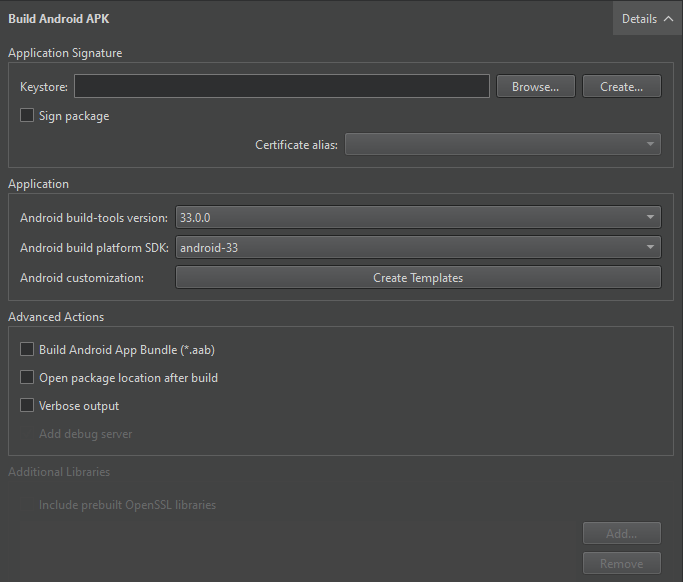
androiddeployqt 工具将根据这些设置生成APK文件。有关可用选项的更多信息,请参阅androiddeployqt。
您可以在“编译输出”中查看androiddeployqt 工具的运行信息。若要查看更多信息,请选择“Verbose output ”。
选择“Add debug server ”可将调试服务器二进制文件包含到包中。
选择 API 级别
在“Android build platform SDK ”字段中,选择用于构建应用程序的API 级别。通常,您应选择可用的最高 API 级别。
通常,您应使用最新版本的 Android SDK 构建工具进行构建。如有必要,可在“Android build-tools version ”字段中选择其他版本。
构建 AAB 文件
若要在本地测试应用程序,请使用 APK 格式,因为“Qt Creator ”可在设备上安装并运行该包。若要分发至 Google Play 商店,请选择“Build Android App Bundle (*.aab) ”以创建 AAB。
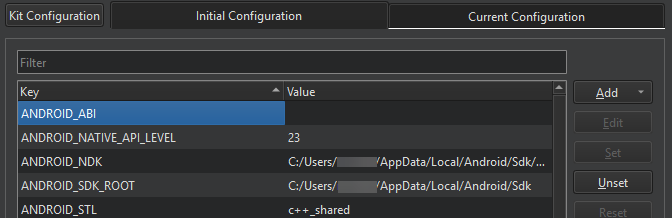
使用 CMake 构建时,您可以在Initial Configuration 的CMake 部分查看已选定的 ABI。您还可以将其他 ABI 设置为ANDROID_ABI 键的值:
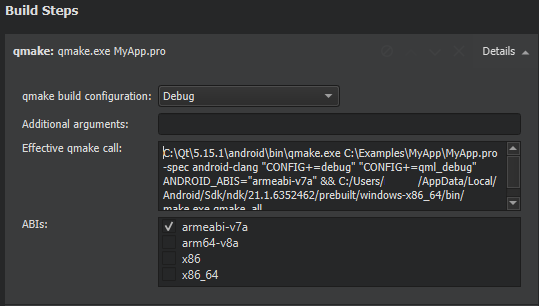
使用 Qbs 或 qmake 构建时,您可以在“Build Steps ”中的“ABIs ”字段中选择 ABI:
构建 AAR
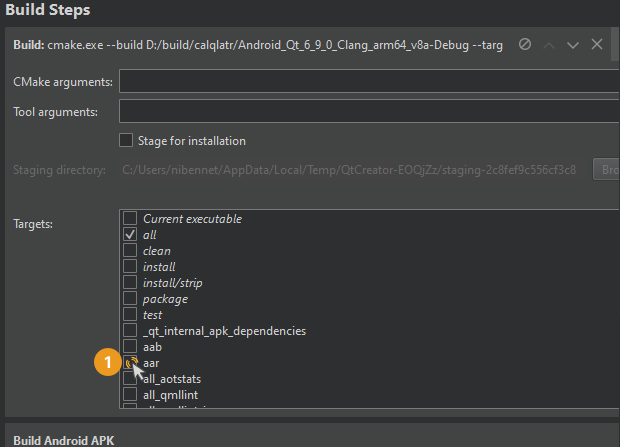
在“Build Steps ”部分中选择 AAR 目标。
另请参阅 《如何:为 Android 开发》和《Android 开发》。
Copyright © The Qt Company Ltd. and other contributors. Documentation contributions included herein are the copyrights of their respective owners. The documentation provided herein is licensed under the terms of the GNU Free Documentation License version 1.3 as published by the Free Software Foundation. Qt and respective logos are trademarks of The Qt Company Ltd in Finland and/or other countries worldwide. All other trademarks are property of their respective owners.
