
添加 MCP 服务器
您可以配置与 MCP 服务器的连接,以便:
- 完成任务
- 使用跨源资源共享(CORS)从 Web 应用程序连接到服务器
您可以使用以下工具:
- 运行命令行工具和其他可执行文件
- 版本控制仓库
- 列出可见文件
- 管理断点
- 获取调试器的堆栈跟踪
- 查找并触发操作
您可以执行以下命令:
- 检索项目依赖项
- 列出某个文件的issue
- 在项目中查找文件
- 在项目文件和其他文件中搜索和替换文本
连接到 MCP 服务器
要添加与 MCP 服务器的连接:
- 转到“Preferences ” > “AI ” > “MCP Servers ”。
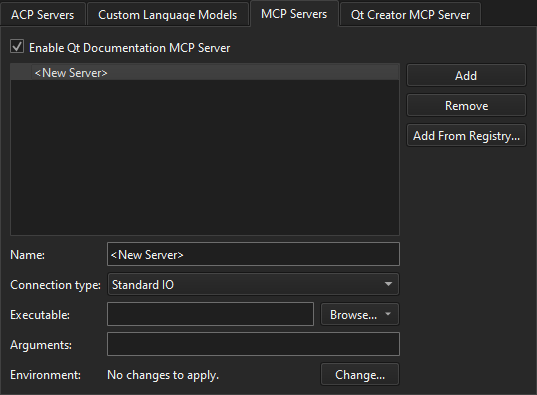
- 选择“Add ”。
- 设置服务器的首选项。
- 选择“Apply ”。
下表总结了相关首选项。
| 设置 | 值 |
|---|---|
| Connection type | MCP 服务器要使用的连接类型。 |
| Executable | 用于启动 MCP 服务器进程的可执行文件。仅用于标准 IO 连接。 |
| Arguments | 启动命令的参数。 |
| Environment | 通过标准 I/O 连接启动 MCP 服务器进程时应用的环境变量更改。 |
从注册表添加 MCP 服务器
若要从注册表安装 MCP 服务器并创建与其的连接:
- 转至Preferences >AI >MCP Servers 。
- 选择“Add from Registry ”。
- 从列表中选择一个 MCP 服务器。
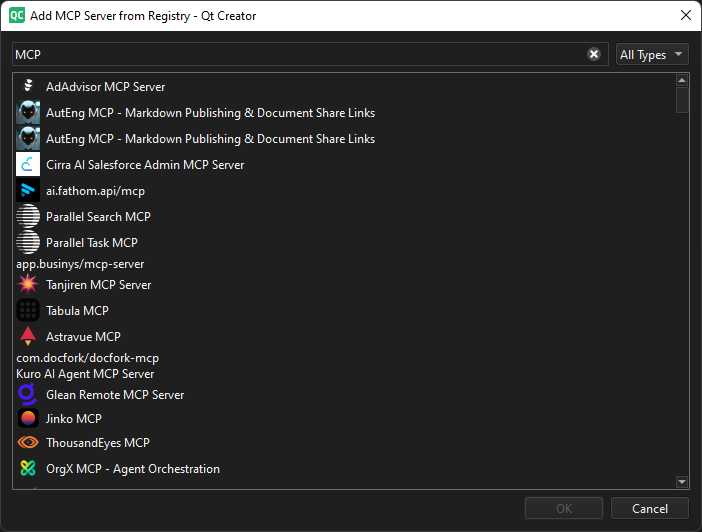
- 选择“OK ”。
另请参阅 “激活扩展”和“操作指南:使用 AI”。
Copyright © The Qt Company Ltd. and other contributors. Documentation contributions included herein are the copyrights of their respective owners. The documentation provided herein is licensed under the terms of the GNU Free Documentation License version 1.3 as published by the Free Software Foundation. Qt and respective logos are trademarks of The Qt Company Ltd in Finland and/or other countries worldwide. All other trademarks are property of their respective owners.
