
创建Qt Quick 测试
Qt Creator 集成了 Qt Quick TestQt Quick 应用程序的单元测试框架,您可以在其中将测试用例编写为 JavaScript 函数。
要创建一个Qt Quick 测试:
- 转到“File ” > “New Project ” > “Test Project ”。
- 选择 Qt Quick Test Project >Choose 。
- 在“Project and Test Information ”对话框中,指定项目和测试的设置。
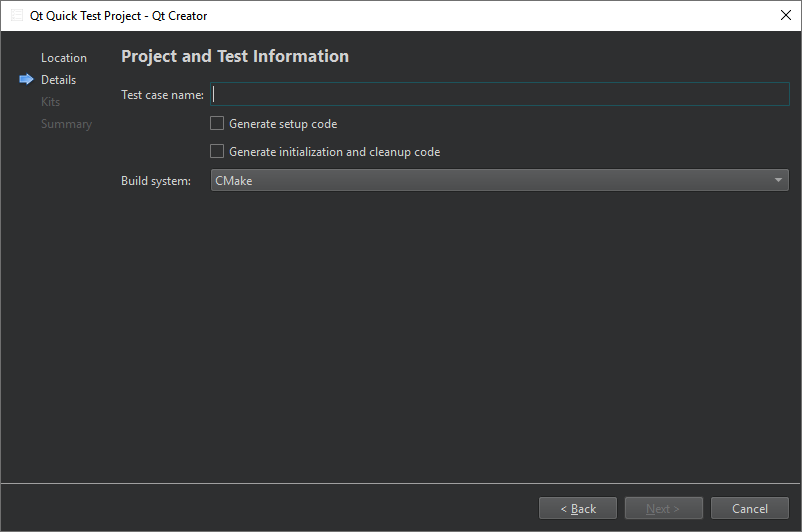
- 在“Test case name ”中,输入测试用例的名称。
- 选择“Generate setup code ”以在运行任何 QML 测试之前执行 C++ 代码。测试框架将调用槽和可调用函数,具体请参阅“在 QML 测试之前执行 C++”。
- 选择“Generate initialization and cleanup code ”可在测试中添加函数,测试框架将执行这些函数以初始化和清理测试。
- 在“Qt code compatibility ”中,选择“Qt6 and higher ”或“Qt5 and higher ”以设置测试的 Qt 版本兼容性。
- 在“Build system ”中,选择用于构建项目的构建系统:CMake、qmake 或 Qbs。若在使用 Qt 5 或 Qt 6.4 及更早版本进行开发时希望使用 CMake 进行构建,请选择“CMake with Qt 5 Compatibility ”。
Qt Creator 将在指定的项目目录中创建测试。编辑.cpp 文件,为测试中的每个测试函数添加私有槽。
注意:在 扫描测试时 ,解析器仅考虑直接或间接包含 QuickTest 或其等效文件QtQuickTest/quicktest.h 的文件。若发现此类文件,解析器会尝试检测用于创建Qt Quick 测试应用程序的语句;若能找到相关语句,则会解析相应的 QML 文件。 如果当前配置下无法构建 C++ 部分,则不会自动扫描 QML 文件。
注意:如果 启用了General >Process arguments ,您可以并行执行测试并写入一个或多个额外的日志文件。请使用输出格式选项-o filename,format 来实现。不支持将标准输出用于filename ,因为Qt Creator 正在使用此输出通道。
Copyright © The Qt Company Ltd. and other contributors. Documentation contributions included herein are the copyrights of their respective owners. The documentation provided herein is licensed under the terms of the GNU Free Documentation License version 1.3 as published by the Free Software Foundation. Qt and respective logos are trademarks of The Qt Company Ltd in Finland and/or other countries worldwide. All other trademarks are property of their respective owners.
