
创建 Google 测试
要创建 Google 测试:
- 访问File >New Project >Test Project 。
- 选择“Google Test Project ” > “Choose ”以创建包含 Google 测试模板代码的项目。
- 在“Project and Test Information ”对话框中,指定项目和测试的设置:
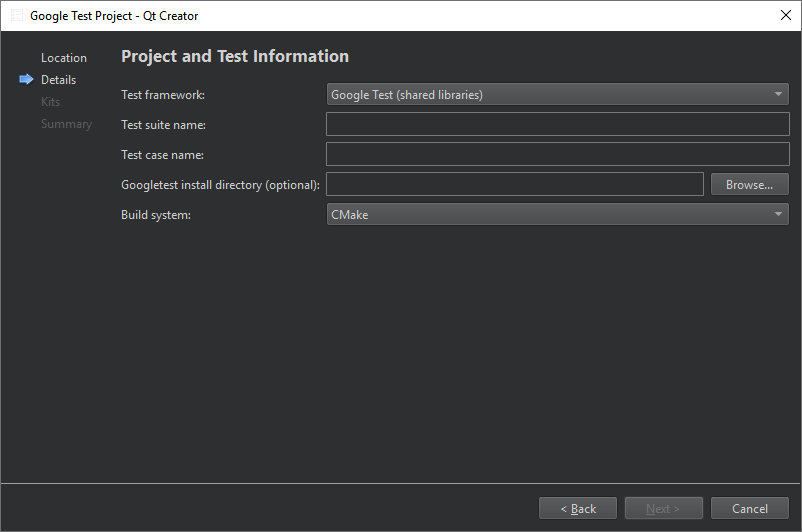
- 在“Test framework ”中,选择“Google Test (shared libraries) ”以链接到 Google Test,或选择“Google Test (headers only) ”将必要的 Google Test 源代码包含到项目中。
- 在“Test suite name ”中,输入测试套件的名称。
- 在“Test case name ”中,为测试用例输入名称。
- 对于共享库测试,您可以在“Googletest install directory (optional) ”中设置 Google C++ 测试框架的安装路径。
- 对于仅头文件测试,您可以在“Googletest source directory (optional) ”中设置 googletest 存储库克隆的路径。
- 在“Build system ”中,选择用于构建项目的构建系统:CMake、qmake 或 Qbs。
Qt Creator 将在指定的项目目录中创建测试。
有关创建 Google 测试的更多信息,请参阅《Google Test 入门指南》。
注意:在 扫描测试时 ,解析器仅考虑直接或间接包含gtest/gtest.h 的文件。当前不会被构建的文件将被忽略。
Copyright © The Qt Company Ltd. and other contributors. Documentation contributions included herein are the copyrights of their respective owners. The documentation provided herein is licensed under the terms of the GNU Free Documentation License version 1.3 as published by the Free Software Foundation. Qt and respective logos are trademarks of The Qt Company Ltd in Finland and/or other countries worldwide. All other trademarks are property of their respective owners.
