
创建状态图
您可以使用Qt Creator 来创建嵌入状态机的应用程序。文件向导会生成包含模板代码的状态图XML(SCXML)文件,您可以使用SCXML编辑器对其进行编辑。您可以使用 Qt SCXML 模块中的类,将根据这些文件生成的 Qt State Machine 嵌入到 Qt 应用程序中。
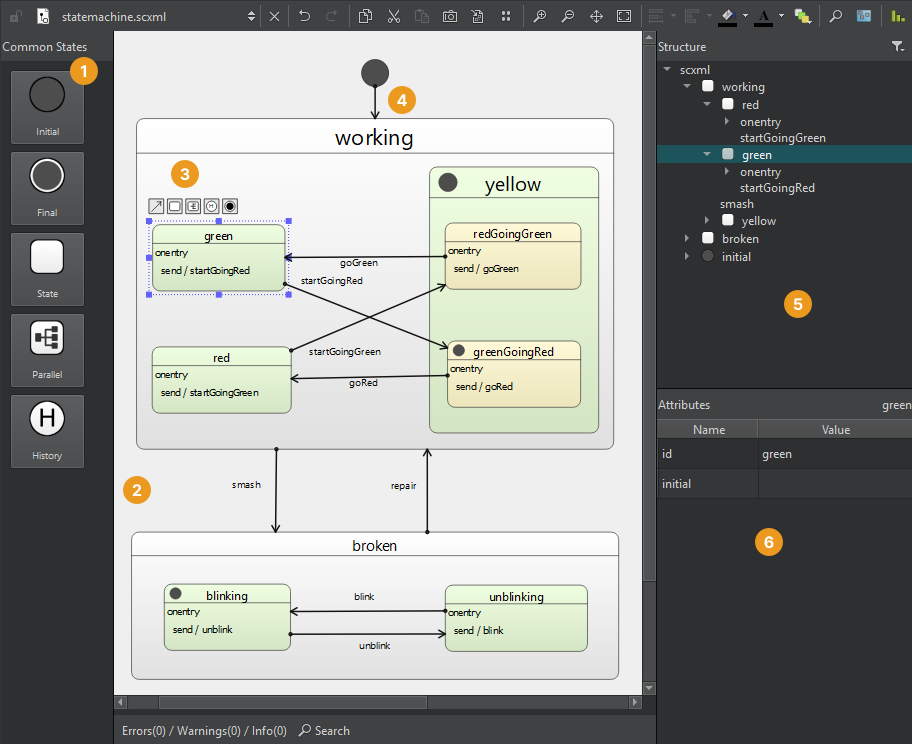
要创建状态图:
- 选择“File ” > “New File ” > “Files and Classes ” > “Modeling ” > “State Chart ” > “Choose ”,以创建一个空的状态图并在 SCXML 编辑器中打开它。
- 将Common States 视图(1)中的一个状态拖动到状态编辑器(2)中。
- 将子状态拖动到初始状态以创建复合状态,或使用工具按钮 (3) 从所选状态及其目标状态创建转换。
- 在编辑器或“Structure ”视图 (5) 中选择一个状态,以便在“Attributes ”视图 (6) 中编辑其属性。
- 选择过渡线 (4) 以向其添加边点。
- 例如,要触发或发送事件,请使用上下文菜单命令将可执行内容添加到状态的“
<onentry>”和“<onexit>”元素或过渡中。
另请参阅 “编辑 SCXML 状态图”。
Copyright © The Qt Company Ltd. and other contributors. Documentation contributions included herein are the copyrights of their respective owners. The documentation provided herein is licensed under the terms of the GNU Free Documentation License version 1.3 as published by the Free Software Foundation. Qt and respective logos are trademarks of The Qt Company Ltd in Finland and/or other countries worldwide. All other trademarks are property of their respective owners.
