
生成 SSH 密钥
为保护Qt Creator 与设备之间的连接,请使用OpenSSH。
如果您没有 SSH 公钥和私钥对,可以在Qt Creator 中生成。连接向导可以为您创建密钥对,您也可以单独创建。
您可以指定密钥长度和密钥算法(RSA 或 ECDSA)。如果您仅将这些密钥用于保护与模拟器或设备之间的连接,则可使用默认值。
- 转至Preferences >Devices >Devices
- 选择“Create New ”。
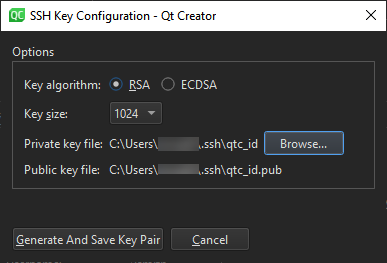
- 在“Private key file ”中,选择保存私钥的位置。“Public key file ”会显示保存相应公钥的位置。
- 选择“Generate And Save Key Pair ”以在指定位置生成并保存密钥。
另请参阅 《操作指南:为远程 Linux 开发》和《为远程 Linux 设备开发》。
Copyright © The Qt Company Ltd. and other contributors. Documentation contributions included herein are the copyrights of their respective owners. The documentation provided herein is licensed under the terms of the GNU Free Documentation License version 1.3 as published by the Free Software Foundation. Qt and respective logos are trademarks of The Qt Company Ltd in Finland and/or other countries worldwide. All other trademarks are property of their respective owners.
