
为远程 Linux 设备进行开发
如果计算机上已安装用于构建嵌入式 Linux 设备应用程序的工具链,请将其添加到设备类型为“Remote Linux Device ”的开发套件中,以便为这些设备构建应用程序并在其上运行。
使用向导将远程 Linux 设备连接到计算机。您稍后可以在“Preferences ”>“Devices ”>“Devices ”中编辑这些设置。
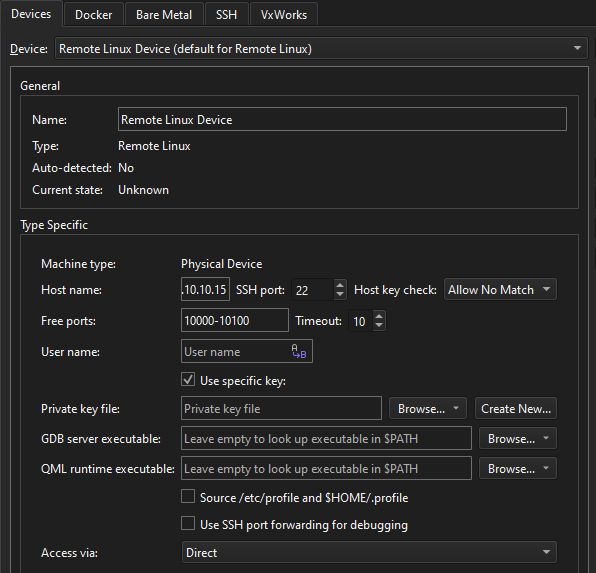
若要在Qt Creator 启动时自动连接到远程Linux设备,请选择“Auto-connect on startup ”。
保护设备连接
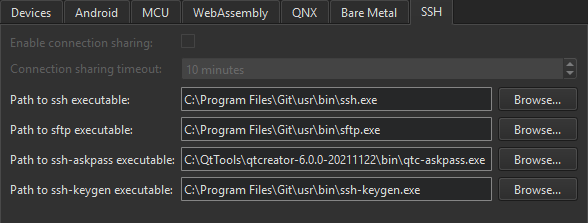
要保护Qt Creator 与设备之间的连接,请使用OpenSSH通过 SSH 协议进行远程登录。OpenSSH 套件不随Qt Creator 一起提供,因此请将其下载并安装到计算机上。然后,在Qt Creator 中配置这些工具的路径。
您需要使用密码或 SSH 公钥和私钥对进行身份验证。如果您没有 SSH 密钥,请使用ssh-keygen 工具在Qt Creator 中创建。
注意: Qt Creator 不存储密码,因此如果您使用密码认证,可能需要在每次连接设备时输入密码;或者,如果启用了缓存功能,则在每次Qt Creator 重启时都需要输入密码。
如果您经常遇到超时问题,请考虑使用基于密钥的身份验证。请在Qt Creator 中使用ssh-keygen 工具创建一个 SSH 密钥。
在 macOS 和 Linux 系统上,请转至Preferences >Devices >SSH ,并在“Connection sharing timeout ”字段中增加 SSH 连接的共享时长(以分钟为单位)。Windows 系统不支持共享连接。
另请参阅 “添加 Docker 设备”、“如何:为远程 Linux 开发”以及“在Qt Application Manager 中运行”。
Copyright © The Qt Company Ltd. and other contributors. Documentation contributions included herein are the copyrights of their respective owners. The documentation provided herein is licensed under the terms of the GNU Free Documentation License version 1.3 as published by the Free Software Foundation. Qt and respective logos are trademarks of The Qt Company Ltd in Finland and/or other countries worldwide. All other trademarks are property of their respective owners.
