
git amend
要将最新更改应用到上一次提交,请访问Tools >Git >Local Repository >Amend Last Commit 。
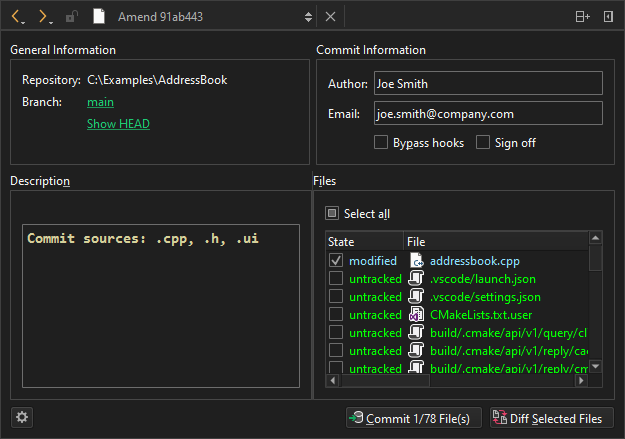
修改 Git 提交
要查看当前分支的日志,请在Branch 中选择分支名称。
要查看修改前的提交内容,请选择Show HEAD 。
要查看所选文件中更改的差异,请选择Diff Selected Files 。
选择“Commit ”以修改该提交。
修改相关提交
若要修改一系列相关提交中的早期提交,请依次选择:Tools >Git >Local Repository >Fixup Previous Commit 。此操作使用交互式重基。若发生冲突,系统会建议使用合并工具。
若要修改最后一次提交的提交信息,请选择Edit commit message 。执行重基时,会弹出用于编辑提交信息的编辑器。
另请参阅 《如何使用 Git》和《Git 入门》。
Copyright © The Qt Company Ltd. and other contributors. Documentation contributions included herein are the copyrights of their respective owners. The documentation provided herein is licensed under the terms of the GNU Free Documentation License version 1.3 as published by the Free Software Foundation. Qt and respective logos are trademarks of The Qt Company Ltd in Finland and/or other countries worldwide. All other trademarks are property of their respective owners.
