
git clean
您可以从项目或本地仓库中移除未处于版本控制下的文件。
- 要清理当前项目目录,请访问Tools >Git >Clean Directory of Project <name> ,然后选择“Current Project Directory ”。
- 要清理本地仓库,请转到Tools >Git >Local Repository ,然后选择“Clean ”。
要清理目录或仓库:
- 在“Clean Repository ”对话框中,选择要删除的文件。
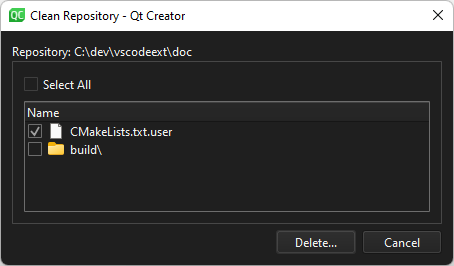
“清理存储库”对话框:默认情况下,被忽略的文件不会被选中。
- 选择“Delete ”以删除所选文件。
另请参阅 《如何:使用 Git》和《Git 使用指南》。
Copyright © The Qt Company Ltd. and other contributors. Documentation contributions included herein are the copyrights of their respective owners. The documentation provided herein is licensed under the terms of the GNU Free Documentation License version 1.3 as published by the Free Software Foundation. Qt and respective logos are trademarks of The Qt Company Ltd in Finland and/or other countries worldwide. All other trademarks are property of their respective owners.
