
在扫描测试之前应用过滤器
若要覆盖当前项目的测试首选项:
- 转至“Projects ” > “Project Settings ” > “Testing ”。
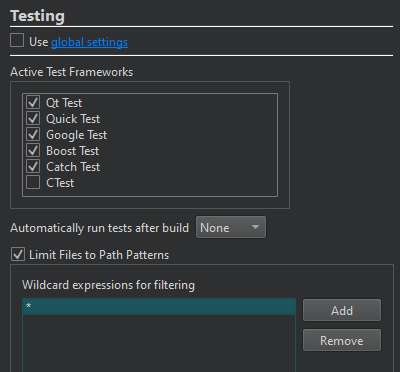
- 清空“Use global settings ”以选择要为该项目处理的测试。
- 若要在当前项目构建成功后自动运行所有或选定的测试,请在“Automatically run tests after build ”中选择“All ”或“Selected ”。
- 要在扫描测试之前应用路径过滤器,请选择“Limit Files to Path Patterns ”。
- 选择“Add ”可将过滤器作为通配符表达式添加。
要删除所选过滤器,请选择“Remove ”。
Copyright © The Qt Company Ltd. and other contributors. Documentation contributions included herein are the copyrights of their respective owners. The documentation provided herein is licensed under the terms of the GNU Free Documentation License version 1.3 as published by the Free Software Foundation. Qt and respective logos are trademarks of The Qt Company Ltd in Finland and/or other countries worldwide. All other trademarks are property of their respective owners.
