
管理 Android NDK 软件包
要查看Qt Creator 安装的Android NDK版本,请转至Preferences >SDKs >Android 。
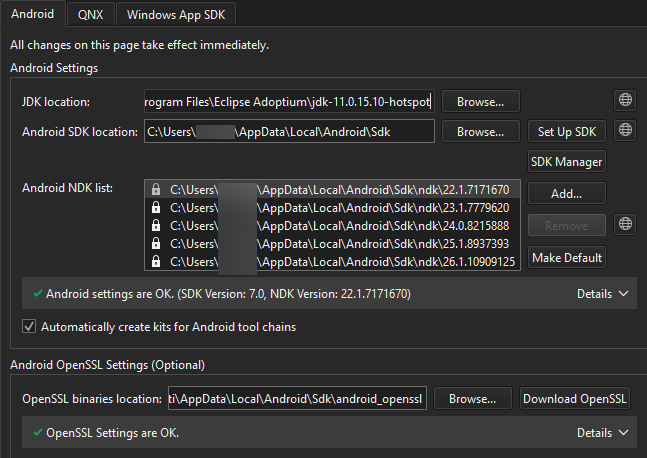
SDK Manager 已安装这些锁定的项目。您只能在“Android SDK Manager ”对话框中对其进行修改。有关详细信息,请参阅“管理 Android SDK 软件包”。
下载 Android NDK
要手动下载 NDK,请选择“ ”。
”。
设置默认 NDK
若要默认将所选 NDK 版本应用于所有 Qt 版本,请选择“Make Default ”。
添加 NDK 路径
若要手动将自定义 NDK 路径添加到全局 NDK 列表中,请选择Add 。这将创建与该 NDK 关联的自定义工具链和调试器。
您必须手动创建一个使用该自定义 NDK 的开发套件。
另请参阅 “添加套件”、“如何:为 Android 开发”以及“为 Android 开发”。
Copyright © The Qt Company Ltd. and other contributors. Documentation contributions included herein are the copyrights of their respective owners. The documentation provided herein is licensed under the terms of the GNU Free Documentation License version 1.3 as published by the Free Software Foundation. Qt and respective logos are trademarks of The Qt Company Ltd in Finland and/or other countries worldwide. All other trademarks are property of their respective owners.
