
添加开发套件
Qt Creator 将用于构建和运行项目的设置组合为套件,以便更轻松地进行跨平台和跨配置开发。 每个套件由一组定义特定环境的值组成,例如设备、编译器、Qt 版本以及要使用的调试器命令,还包含一些元数据,例如套件的图标和名称。定义好套件后,您就可以选择它们来构建和运行项目。
您可以为桌面以及以下类型的设备添加套件:
- Android
- Bare Metal
- Boot to Qt (仅限商业版)
- Docker(实验性)
- iOS
- iOS 模拟器
- MCU(仅限商业用途)
- QNX
- 远程 Linux
- VxWorks
- WebAssembly 运行时
要添加套件:
- 选择“Preferences ” > “Kits ”。
- 选择“Add ”以从空白套件开始,或选择“Clone ”以克隆所选套件并编辑其首选项。
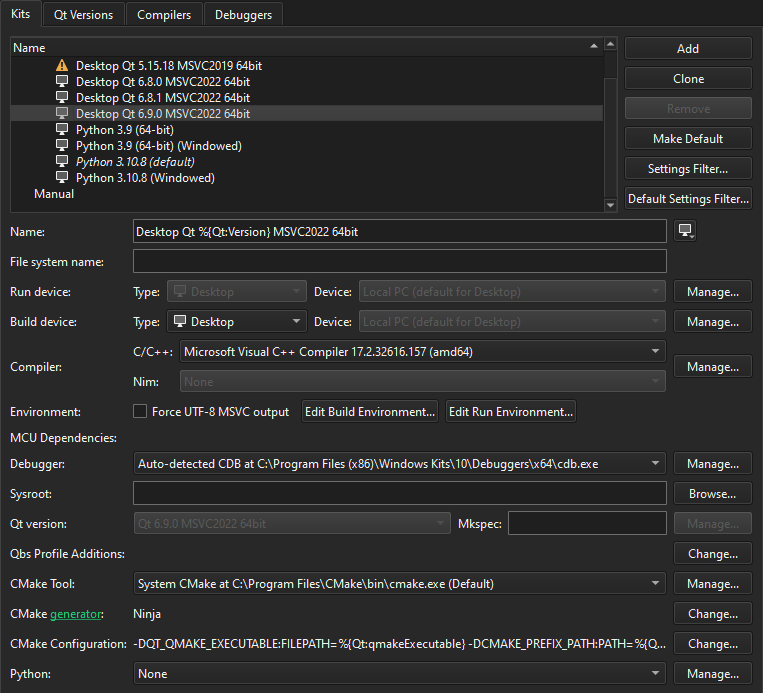
- 根据构建系统和设备类型设置套件首选项。
- 选择“Apply ”以创建套件。
设置默认套件
Qt Creator 如果系统没有足够的信息来选择要使用的套件,则会使用默认套件。要将所选套件设置为默认套件,请选择“Make Default ”。
另请参阅 “操作指南:管理套件”和“管理套件”。
Copyright © The Qt Company Ltd. and other contributors. Documentation contributions included herein are the copyrights of their respective owners. The documentation provided herein is licensed under the terms of the GNU Free Documentation License version 1.3 as published by the Free Software Foundation. Qt and respective logos are trademarks of The Qt Company Ltd in Finland and/or other countries worldwide. All other trademarks are property of their respective owners.
