
管理 Windows App SDK 软件包
创建一个用于下载 Windows App SDK 的文件夹,然后使用NuGet下载并安装该 SDK。
要下载并安装 Windows App SDK:
- 访问Preferences >SDKs >Windows App SDK 。
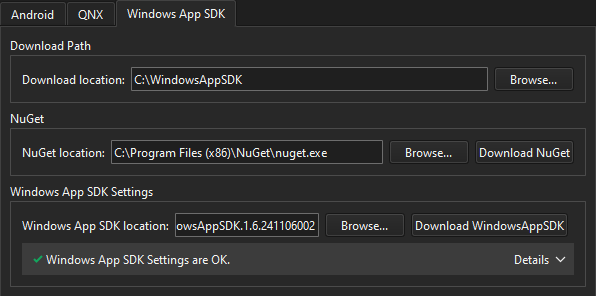
- 在Download location 中,指定用于下载 NuGet 和 SDK 的文件夹路径。
- 在NuGet location 中,指定 NuGet 的路径,或选择Download NuGet 以自动下载并安装 NuGet。
- 在“Windows App SDK location ”中,指定 SDK 的安装目录,或选择“Download WindowsAppSDK ”以通过 NuGet 自动下载并安装 SDK。
另请参阅 《Windows 桌面开发》。
Copyright © The Qt Company Ltd. and other contributors. Documentation contributions included herein are the copyrights of their respective owners. The documentation provided herein is licensed under the terms of the GNU Free Documentation License version 1.3 as published by the Free Software Foundation. Qt and respective logos are trademarks of The Qt Company Ltd in Finland and/or other countries worldwide. All other trademarks are property of their respective owners.
