
从文档中搜索
在“Help ”模式下的Search 面板中,可使用全文搜索功能在所有已安装的文档中查找特定词汇。输入要查找的词条,然后选择Search 。所有包含该词条的文档都会被列出。列表按文档版本(例如,如果您安装了多个 Qt 版本)以及文档中的搜索结果数量进行排序。 在列表中选择一个文档即可将其打开。
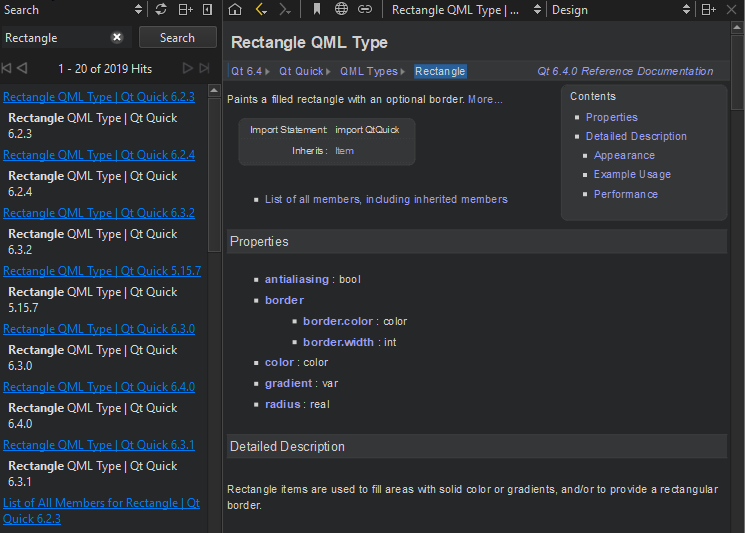
以下是一些常见的搜索示例:
deep列出所有包含单词“deep”的文档。搜索不区分大小写。deep*列出所有包含以deepdeep copy列出同时包含deep和copy"deep copy"列出包含短语deep copy
全文搜索基于首次打开“Search ”窗格时对所有已安装文档进行的索引。如果您添加或移除文档,Qt Creator 将重新生成索引。
如果您找不到明明存在的词,可能是索引不完整。要重新生成索引,请选择“ ”(Regenerate Index )。
标点符号不包含在索引词中。若要查找包含标点符号的词条(例如域名),请使用星号作为通配符。例如,要查找Pastebin.Com ,请输入搜索词Pastebin* 。
另请参阅 《如何阅读文档》。
Copyright © The Qt Company Ltd. and other contributors. Documentation contributions included herein are the copyrights of their respective owners. The documentation provided herein is licensed under the terms of the GNU Free Documentation License version 1.3 as published by the Free Software Foundation. Qt and respective logos are trademarks of The Qt Company Ltd in Finland and/or other countries worldwide. All other trademarks are property of their respective owners.
