
选择帮助首页
若要设置打开“Help ”模式时显示的页面,请转至Preferences >Help >General ,然后选择“On help start ”。
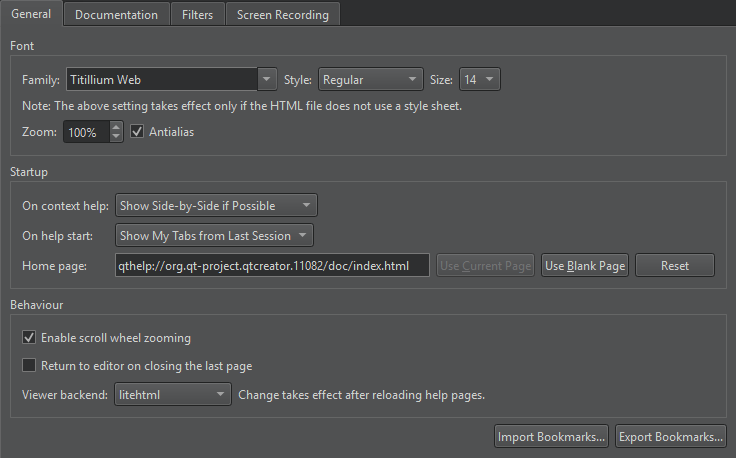
- 若要显示退出该模式时已打开的页面和帮助视图,请选择“Show My Tabs from Last Session ”选项。但网页不会被打开,因为加载这些网页会减慢“Help ”模式的启动速度。
- 若要显示特定页面,请选择“Show My Home Page ”,并在“Home Page ”中指定该页面。
- 若要显示空白页面,请选择“Show a Blank Page ”选项。选择“Use Blank Page ”可将空白页面设为您的主页。
另请参阅 《如何:阅读文档》。
Copyright © The Qt Company Ltd. and other contributors. Documentation contributions included herein are the copyrights of their respective owners. The documentation provided herein is licensed under the terms of the GNU Free Documentation License version 1.3 as published by the Free Software Foundation. Qt and respective logos are trademarks of The Qt Company Ltd in Finland and/or other countries worldwide. All other trademarks are property of their respective owners.
