
使用 Vale
Vale 是一款代码检查工具,用于检查文档源文件中的风格、语法和术语问题。Vale Language Server 扩展通过语言服务器协议 (LSP) 将 Vale 集成到Qt Creator 中。
注意:请安装 “Vale Language Server ”扩展程序以使用 Vale。
设置 Vale 配置文件
要使用 Vale,您需要一个.vale.ini 配置文件。有关详细信息,请参阅Vale:.vale.ini。
要设置您的.vale.ini 配置文件路径,请转至Preferences >Vale >Config path 。
运行 Vale
安装扩展并创建配置文件后,打开一个您希望通过 Vale 进行检查的文本文件。
Qt Creator 系统会提示您允许该扩展程序从 Vale 语言服务器获取更新。若要查看将下载的内容,请选择“Show Details ”。
您可以在编辑器中以注释的形式看到 Vale 提供的建议。
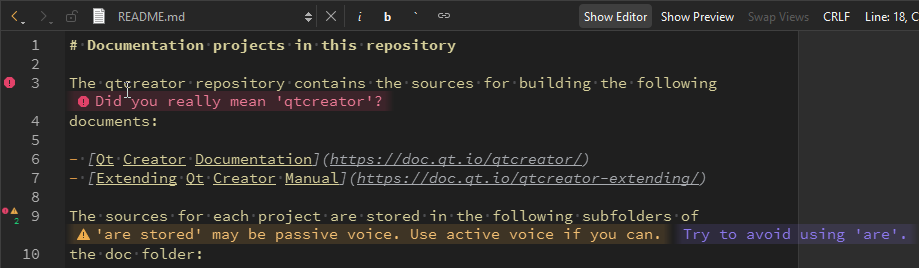
设置 Vale 首选项
若需稍后安装语言服务器或使用其他 Vale LS 安装:
- 转至“Preferences ” > “Vale ” > “Language Server ”。
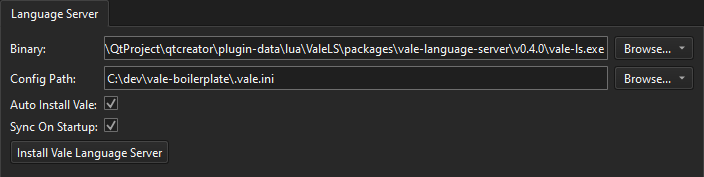
- 在“Binary ”中,设置 Vale 语言服务器可执行文件的路径。
- 在“Config path ”中,设置 Vale 配置文件的路径。
- 选择“Auto install Vale ”以自动安装 Vale CLI。
- 选择“Sync on startup ”以在服务器启动时运行 `
vale sync`。 - 选择“Install Vale Language Server ”以安装 Vale 语言服务器。
另请参阅 《如何:管理语言服务器》、《安装扩展》和《管理语言服务器》。
Copyright © The Qt Company Ltd. and other contributors. Documentation contributions included herein are the copyrights of their respective owners. The documentation provided herein is licensed under the terms of the GNU Free Documentation License version 1.3 as published by the Free Software Foundation. Qt and respective logos are trademarks of The Qt Company Ltd in Finland and/or other countries worldwide. All other trademarks are property of their respective owners.
