
对 Android 包进行签名
要发布您的应用,必须使用由证书和相应的私钥组成的公私钥对(该密钥对通过别名进行标识)对其进行签名。该密钥对用于验证您应用的未来版本确实由您创建。
警告:请将 密钥对保存在 安全的地方并制作备份副本,因为一旦丢失密钥对,您将无法更新应用程序。
您可以使用Qt Creator 生成密钥库和自签名证书。 生成的证书采用 X.509 v3 数字证书的结构。其中包含证书的版本、序列号和有效期信息,用于加密数据的算法标识符,以及证书的签发机构和证书主体(所有者)信息。 对于自签名证书,证书的签发者和所有者是同一个人。此外,证书还包含用于对证书进行签名的算法信息以及证书的签名。
密钥库由密码保护。此外,您还可以为每个别名设置独立的密码。
在对 Android 应用程序进行签名时,必须从密钥库中选择一个包含证书的密钥库,并从中选择一个证书别名。签名过程会将该别名的公钥(证书)嵌入到 APK 中。
创建密钥库和证书
要创建密钥库和自签名证书:
- 访问Projects >Build Settings >Build Android APK ,然后选择“Details ”。
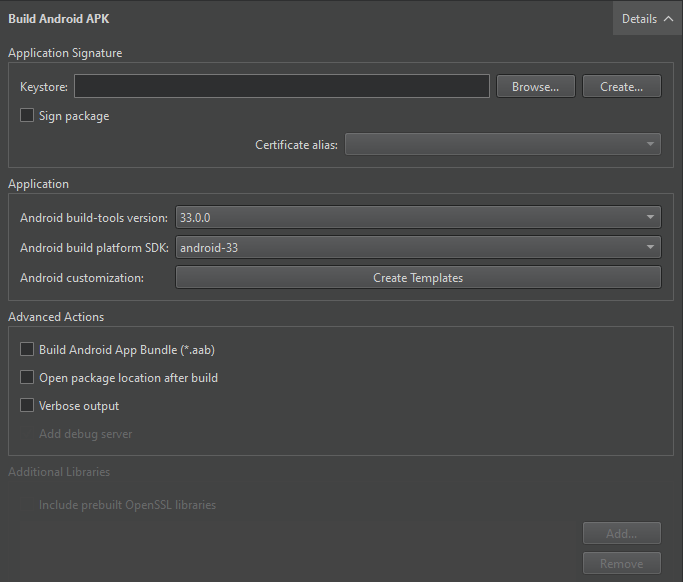
- 在“Keystore ”字段中,选择“Create ”,以便在“Create a Keystore and a Certificate ”对话框中创建包含一组密钥对的新密钥库:
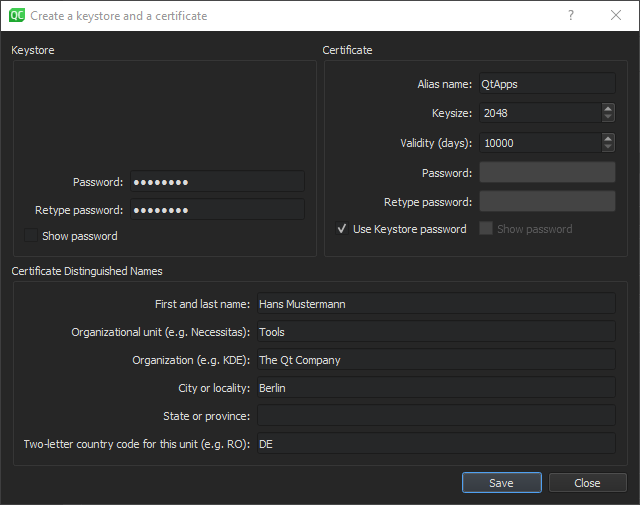
- 在“Keystore ”组中,输入密码以保护密钥库。
- 在“Certificate ”组中,指定证书的密钥大小和有效期。您可以指定一个单独的密码来保护密钥对,也可以使用密钥库密码。
- 在“Certificate Distinguished Names ”组中,输入有关您本人以及您所在公司或组织的信息,以标识证书签发者和密钥对的所有者。
- 选择“Save ”。
- 在“Keystore File Name ”对话框中,输入密钥库的名称并选择其存储位置。
- 在“Keystore ”对话框中,输入密钥库密码以在密钥库中创建密钥对。
对软件包进行签名
要使用密钥对对 Android 软件包进行签名:
- 转到“Projects ” > “Build Settings ” > “Build Android APK ”,然后选择“Details ”。
- 在“Keystore ”字段中,选择“Choose ”以选择一个现有的密钥库。
- 在“Certificate alias ”字段中,从密钥库所含的密钥对列表中选择一个别名。
- 选择“Sign package ”(使用该别名),以使用该别名对 Android 软件包进行签名。
另请参阅 《如何:进行 Android 开发》和《Android 开发》。
Copyright © The Qt Company Ltd. and other contributors. Documentation contributions included herein are the copyrights of their respective owners. The documentation provided herein is licensed under the terms of the GNU Free Documentation License version 1.3 as published by the Free Software Foundation. Qt and respective logos are trademarks of The Qt Company Ltd in Finland and/or other countries worldwide. All other trademarks are property of their respective owners.
