
指定 Android 运行设置
若要为套件中选定的“运行设备”指定应用程序的运行设置,请转至Projects >Run Settings 。
要在 Android 设备上运行和调试应用程序,必须按照《Android 开发》中的说明,从开发主机到设备建立连接。
am 启动选项
Qt Creator 在启动应用程序时应用一组默认的 Android 活动管理器 (am) 启动选项。您可以在“Activity manager start arguments ”字段中指定其他启动选项。但是,如果默认选项与添加的选项发生冲突,应用程序可能无法启动。
Activity 管理器在正常运行时的默认参数:
am start -n <package_name>/<QtActivity_name>
调试模式下 Activity 管理器的默认参数:
am start -n <package_name>/<QtActivity_name> -D
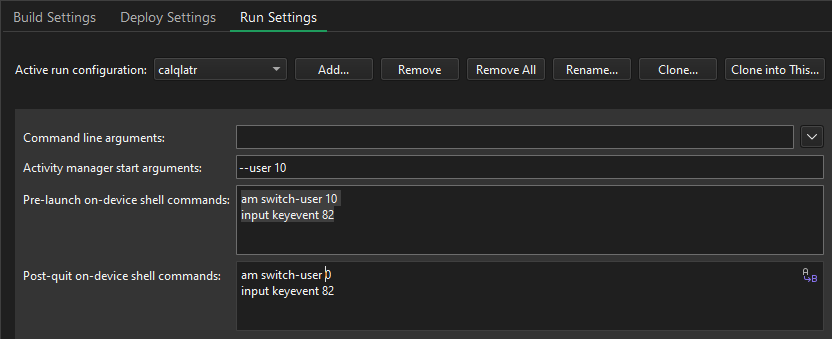
例如,若要以特定用户身份运行应用程序,请输入启动选项 `--user 10`,其中 `10 ` 是该用户账户的用户 ID。
Shell 命令
您可以指定在应用程序启动前和退出后执行的 shell 命令。例如,在Pre-launch on-device shell commands 中输入以下命令,可在运行应用程序前解锁屏幕并切换到设备上的用户账户10 :
input keyevent 82
am switch-user 10
在Post-quit on-device shell commands 中输入以下命令,以便在应用程序退出后切换回默认用户0 并解锁屏幕:
am switch-user 0
input keyevent 82
另请参阅 “为项目激活开发套件”、“配置项目以供运行”、“如何:进行 Android 开发”、“Android 开发”以及“管理开发套件”。
Copyright © The Qt Company Ltd. and other contributors. Documentation contributions included herein are the copyrights of their respective owners. The documentation provided herein is licensed under the terms of the GNU Free Documentation License version 1.3 as published by the Free Software Foundation. Qt and respective logos are trademarks of The Qt Company Ltd in Finland and/or other countries worldwide. All other trademarks are property of their respective owners.
