
启用 Silver Searcher
如果您在计算机上安装了 Silver Searcher,即可将其用作Qt Creator 中的搜索引擎。
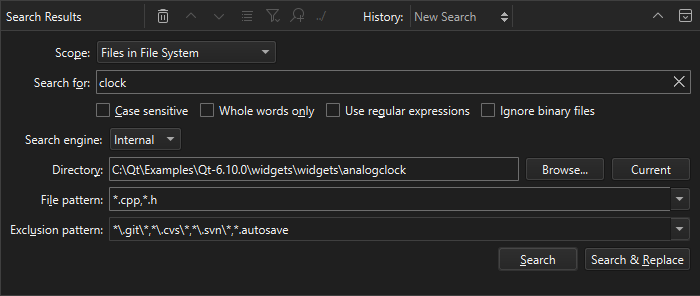
注意:需启用 SilverSearcher 插件才能使用。
要使用 Silver Searcher:
- 从The Silver Searcher或GitHub 下载并安装 Silver Searcher。
在某些平台上,您可能需要从源代码编译 Silver Searcher。
- 搜索时,请在“Search engine ”中选择“Silver Searcher ”。
如果Qt Creator 无法找到Silver Searcher,可能是因为您将其安装在了未在PATH 环境变量中设置的路径下。
设置 Silver Searcher 的安装路径
要告知Qt Creator “Silver Searcher” 的位置:
- 进入Preferences >Environment >System 。
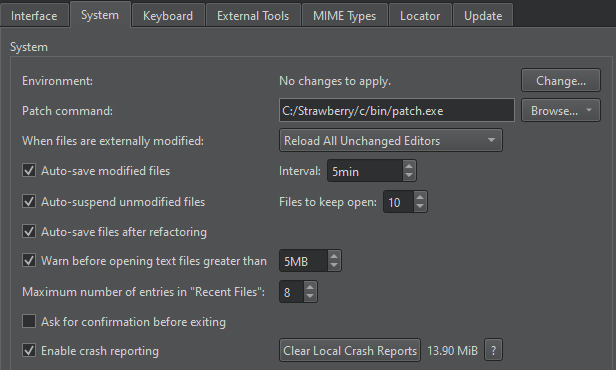
- 在Environment 中,选择“Change ”。
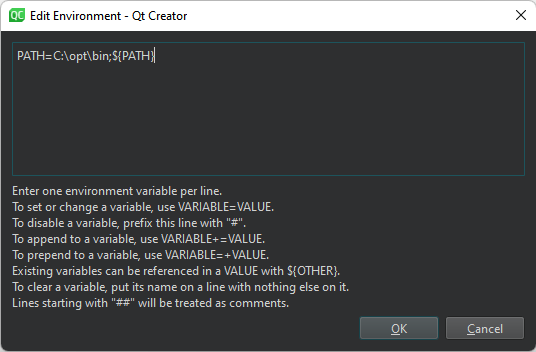
- 在“Edit Environment ”中,添加 Silver Searcher 可执行文件的路径:
PATH=</path/to/bin>:${PATH}
Copyright © The Qt Company Ltd. and other contributors. Documentation contributions included herein are the copyrights of their respective owners. The documentation provided herein is licensed under the terms of the GNU Free Documentation License version 1.3 as published by the Free Software Foundation. Qt and respective logos are trademarks of The Qt Company Ltd in Finland and/or other countries worldwide. All other trademarks are property of their respective owners.
