
启用和禁用插件
Qt Creator 在 Linux、macOS 和 Windows 系统上,标准功能(例如“关于”对话框)使用标准名称和位置。
| Linux 和 Windows | macOS |
|---|---|
| Help >About Plugins | Qt Creator >About Plugins |
新的Qt Creator 插件通常作为实验性插件推出,以便您在它们获得全面支持之前先进行试用。实验性插件默认处于禁用状态,您必须在重启Qt Creator 后将其启用才能使其显示出来。默认情况下,该插件所依赖的所有插件也会一并启用。
您还可以禁用不常用的插件,以优化Qt Creator 的运行。如果您禁用某个插件,Qt Creator 会提示您禁用所有依赖该插件的插件。这可能会导致某些功能无法正常工作。此外,即使您再次启用该插件,其他依赖插件也不会自动启用。
要启用或禁用插件:
- 访问About Plugins 。
- 在“Filter ”字段中输入内容以查找插件。
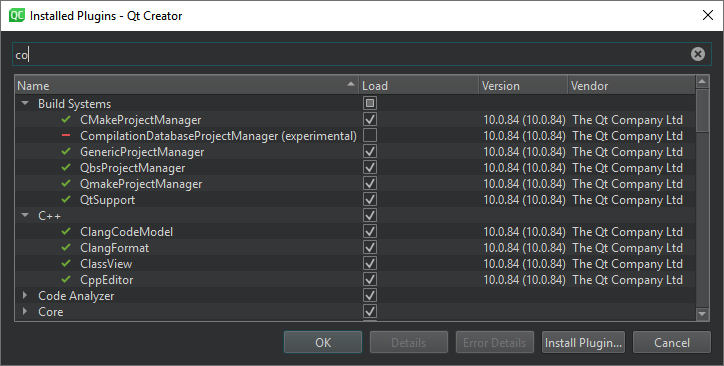
- 选中“Load ”复选框以启用插件,或取消选中以禁用插件。
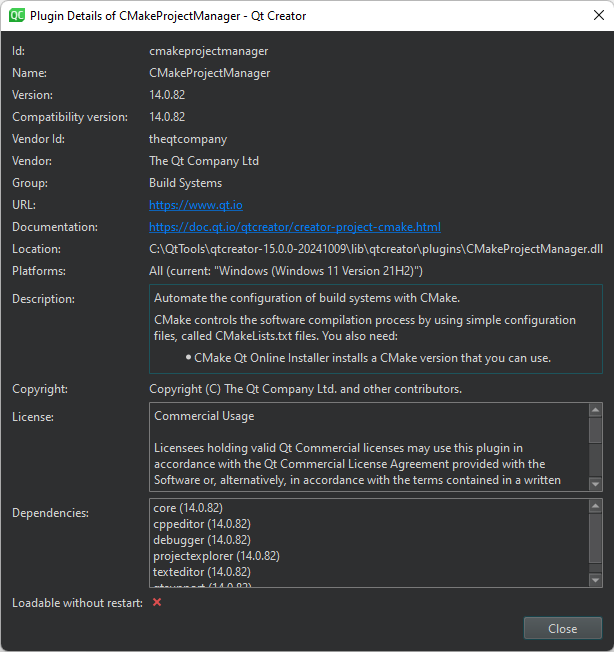
- 选中“Details ”可查看插件的更多信息,例如其用途、供应商、许可证和依赖项。
- 选择“OK ”。
- 选中“Restart Now ”以重启Qt Creator 并使更改生效。
另请参阅 “安装插件”。
Copyright © The Qt Company Ltd. and other contributors. Documentation contributions included herein are the copyrights of their respective owners. The documentation provided herein is licensed under the terms of the GNU Free Documentation License version 1.3 as published by the Free Software Foundation. Qt and respective logos are trademarks of The Qt Company Ltd in Finland and/or other countries worldwide. All other trademarks are property of their respective owners.
