
启用崩溃报告
Qt Creator 使用Google Breakpad收集有关崩溃的信息,并将其发送至Sentry进行处理。Breakpad 可能会从崩溃进程的内存中捕获任意内容,包括用户敏感信息、URL 以及用户已信任并提供给Qt Creator 的其他内容。不过,崩溃报告仅用于修复软件错误。
要启用崩溃报告:
- 访问Preferences >Environment >System 。
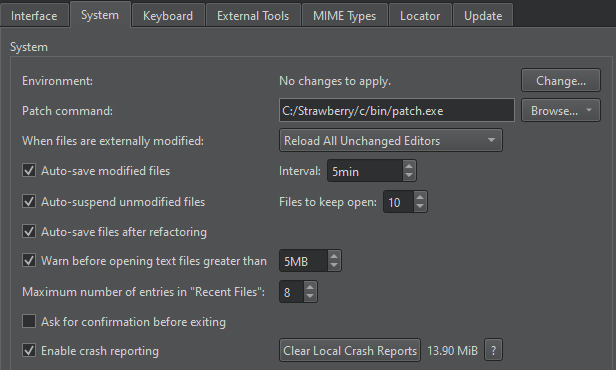
- 选择Enable crash reporting 。
如果崩溃报告未超过 Sentry 设定的文件大小限制,系统会自动发送。您不会收到关于报告发送情况或发送成功与否的通知。
选择“? ”以查看有关 Breakpad 及安全策略的更多信息。
崩溃报告的存储位置
Qt Creator 将崩溃报告存储在计算机的以下目录中:
- 在 Windows 上:
%APPDATA%\QtProject\qtcreator\crashpad_reports - 在 Linux 和 macOS 上:
$HOME/.config/QtProject/qtcreator/crashpad_reports
注意: 报告崩溃的最佳方式 是创建一个错误报告,并在其中粘贴相应的堆栈跟踪信息。
另请参阅 “联系 Qt”。
Copyright © The Qt Company Ltd. and other contributors. Documentation contributions included herein are the copyrights of their respective owners. The documentation provided herein is licensed under the terms of the GNU Free Documentation License version 1.3 as published by the Free Software Foundation. Qt and respective logos are trademarks of The Qt Company Ltd in Finland and/or other countries worldwide. All other trademarks are property of their respective owners.
