
设置版本控制系统
Qt Creator 使用版本控制系统的命令行客户端来访问您的代码仓库。请确保命令行客户端位于PATH 环境变量中,或者在Preferences >Version Control 中的“版本控制系统”专用选项卡中指定命令行客户端可执行文件的路径。
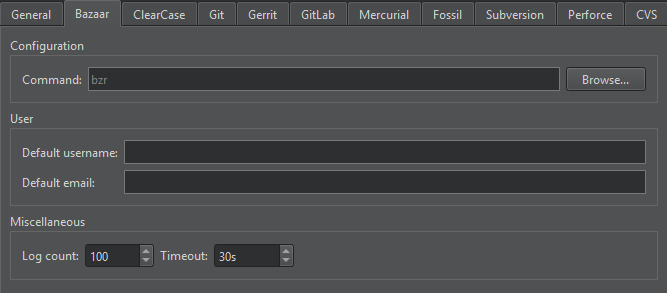
其他配置选项取决于所使用的版本控制系统。设置好版本控制系统后,请通过命令行验证一切是否正常(例如,使用 status 命令)。如果未出现任何问题,您即可通过Qt Creator 使用该系统。
有关使用 Git for Windows 的更多信息,请参阅《使用 Git for Windows》。
通用 VCS 首选项
转至Preferences > “Version Control ” > “General ” 以指定提交消息的设置:
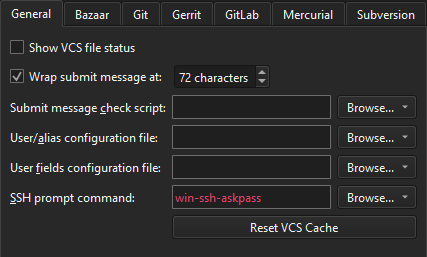
- Show VCS file status with refresh interval 设置Qt Creator 向版本控制系统请求文件状态更新的间隔(以秒为单位)。已更改的文件将在“项目”、“文件系统”或“打开的文档”视图中以不同颜色显示。
- Wrap submit messages at 将提交消息的行长限制为指定的字符数。
- Submit message check script 是一个在提交前对提交消息进行检查的脚本或程序。提交消息是该脚本的第一个参数。如果出现错误,脚本应将错误信息输出到标准错误流,并返回非零退出代码。
- User/alias configuration file 是一个以 mailmap 格式列出作者姓名的文本文件。对于每位作者,必须指定真实姓名和电子邮件地址,并可选地指定别名和第二个电子邮件地址。例如:
Jon Doe <Jon.Doe@company.com> jdoe <jdoe@somemail.com>
Hans Mustermann <Hans.Mustermann@company.com> hm <info@company.com>
在此字段中指定文件后,您可以在“Nicknames ”对话框中将作者作为提交消息字段的值进行选择。
- User fields configuration file 是一个简单的文本文件,其中各行指定了以作者为值的提交消息字段,例如:
Acked-by:
Initial-patch-by:
Reported-by:
Rubber-stamped-by:
Signed-off-by:
Tested-by:
在此字段中指定文件后,提交更改时即可将作者作为提交消息字段的值添加。如果您还指定了“User/alias configuration file ”,则可在“Nicknames ”对话框中选择作者。
- SSH prompt command 指定一个 ssh-askpass 命令,您可以在 Linux 系统上使用该命令,在使用 SSH 时提示用户输入密码。例如,
ssh-askpass或x11-ssh-askpass,具体取决于您使用的 ssh-askpass 实现。 - Reset VCS Cache 在您(例如)通过命令行更改配置后,将版本控制系统配置重置为Qt Creator 所识别的状态。
Copyright © The Qt Company Ltd. and other contributors. Documentation contributions included herein are the copyrights of their respective owners. The documentation provided herein is licensed under the terms of the GNU Free Documentation License version 1.3 as published by the Free Software Foundation. Qt and respective logos are trademarks of The Qt Company Ltd in Finland and/or other countries worldwide. All other trademarks are property of their respective owners.
