
在 Windows 上使用连接点
在 Windows 上,项目路径过长可能会导致构建失败。
要解决这些问题:
- 请使用绝对路径较短的源代码目录名称。例如,使用
C:\dev代替C:\Users\My Name\Projects。 - 使用简短的构建目录路径。
- 使用 Ninja 生成器来生成 CMake。
- 在 Windows 上为源代码目录和构建目录使用符号链接。
符号链接
在连接点处,一个目录充当计算机上另一个目录的别名。
要将连接点用于 CMake 的配置、构建和安装操作,请转到Preferences >CMake >General ,然后选择“Use junctions for CMake configuration and build operations ”。
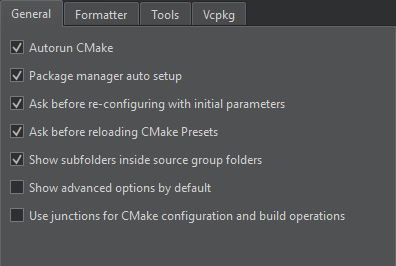
该构建系统通过连接点对项目进行配置、编译和安装,从而简化了命令行操作。
设置环境变量
Qt Creator 将连接点存储在C:\ProgramData\QtCreator\Links 中。若要使用其他路径,请将其设置为QTC_CMAKE_JUNCTIONS_DIR 环境变量的值。
设置QTC_CMAKE_JUNCTIONS_HASH_LENGTH 环境变量,可将 MD5 哈希键的长度从默认值 32 缩短。
另请参阅 《如何使用 CMake 进行构建》。
Copyright © The Qt Company Ltd. and other contributors. Documentation contributions included herein are the copyrights of their respective owners. The documentation provided herein is licensed under the terms of the GNU Free Documentation License version 1.3 as published by the Free Software Foundation. Qt and respective logos are trademarks of The Qt Company Ltd in Finland and/or other countries worldwide. All other trademarks are property of their respective owners.
