
查看 CMake 项目内容
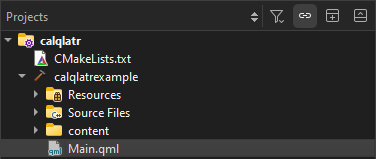
“项目”视图将项目的构建系统结构以树形结构可视化显示,并列出了项目中的所有文件。当您在项目中编辑CMakeLists.txt 配置文件时,Qt Creator 会自动运行 CMake 以刷新视图中的项目信息。此外,在构建项目时,系统也会刷新项目信息。
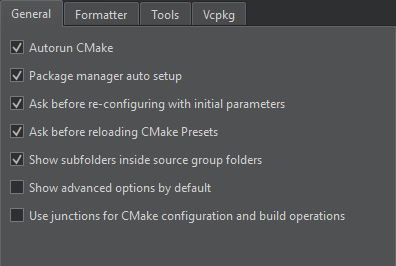
若要禁用此行为,请前往“Preferences ” > “CMake ” > “General ”,并取消勾选“Autorun CMake ”。
重新配置 CMake 项目
如果Qt Creator 无法加载 CMake 项目,Projects 视图会显示一个<File System> 项目节点,以避免扫描文件系统并加快项目加载速度。该节点显示的文件与“文件系统”视图中的文件相同。
要重新配置该项目:
- 转到“Build ”,然后选择“Clear CMake Configuration ”。
- 转到“Build ”,然后选择“Run CMake ”。
在“项目”视图中隐藏子文件夹名称
“Projects ”视图会显示源文件所在子文件夹的名称。若要隐藏子文件夹名称并仅按源文件组对文件进行排列,请选择“Preferences ” > “CMake ” > “General ”,然后取消选中“Show subfolders inside source group folders ”复选框。转到“Build ”并选择“Run CMake ”后,更改即生效。
另请参阅 《如何:使用 CMake 构建》、《CMake》、《打开项目》、《文件系统》和《项目》。
Copyright © The Qt Company Ltd. and other contributors. Documentation contributions included herein are the copyrights of their respective owners. The documentation provided herein is licensed under the terms of the GNU Free Documentation License version 1.3 as published by the Free Software Foundation. Qt and respective logos are trademarks of The Qt Company Ltd in Finland and/or other countries worldwide. All other trademarks are property of their respective owners.
