
查看来自 Coco 的代码覆盖率报告
注意:需启用 Coco 插件才能使用该功能。
借助 Coco CoverageBrowser,您可以通过加载由 Coco CoverageScanner 生成的插桩数据库(.csmes 文件)来分析测试覆盖率。
有关如何在Qt Creator 中为代码覆盖率设置项目的更多信息,请参阅“通过 Coco 设置代码覆盖率”。
要测量和检查代码覆盖率:
- 转到Analyze >Squish Coco 。
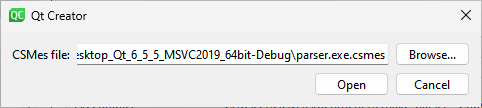
- 在CSMes file 中,选择要加载的仪器化数据库。
- 选择“Open ”以启动 CoverageBrowser。
- 在 CoverageBrowser 中,转到File >Load Execution Report ,并选择用于覆盖率扫描的
.csexe文件。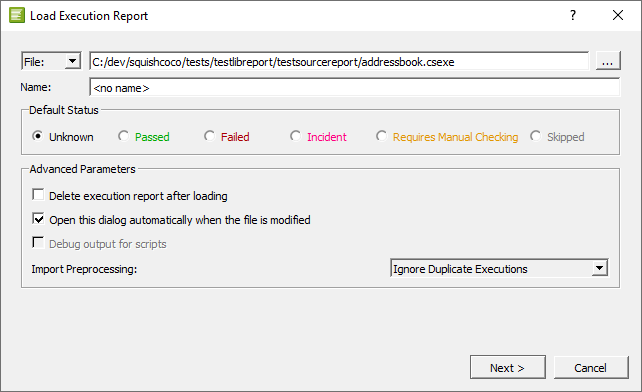
- 若要保留执行报告,请清除“Delete execution report after loading ”中的内容。
在Qt Creator 中打开已分析的文件。在Edit 模式下,您可以在代码后面看到分析结果。您可以更改不同类型结果所使用的字体和颜色。
禁用代码覆盖率查看功能Qt Creator
在Analyze >Squish Coco 中设置好仪器化数据库后,每次启动Qt Creator 时,CoverageBrowser都会自动启动。若要禁用此功能,请将CSMes file 中的内容替换为空字符串。
更改字体和颜色
若要更改默认字体和颜色,请转至Preferences >Text Editor >Font & Colors 。创建您自己的配色方案,并为以下结果选择新的字体和颜色:
- 代码覆盖率 已添加代码
- 部分覆盖的代码
- 未覆盖的代码
- 完全覆盖的代码
- 手动验证的代码
- 代码覆盖率:死代码
- 代码覆盖率执行次数过低
- 隐式未覆盖代码
- 隐式覆盖的代码
- 隐式手动覆盖率验证
另请参阅 “启用和禁用插件”、“从 Coco 设置代码覆盖率”、“配置编辑器”以及“分析代码”。
Copyright © The Qt Company Ltd. and other contributors. Documentation contributions included herein are the copyrights of their respective owners. The documentation provided herein is licensed under the terms of the GNU Free Documentation License version 1.3 as published by the Free Software Foundation. Qt and respective logos are trademarks of The Qt Company Ltd in Finland and/or other countries worldwide. All other trademarks are property of their respective owners.
