
编辑 Markdown 文件
打开Markdown(.md )文件,或前往File >New File ,然后选择General >Markdown File 来创建新文件。
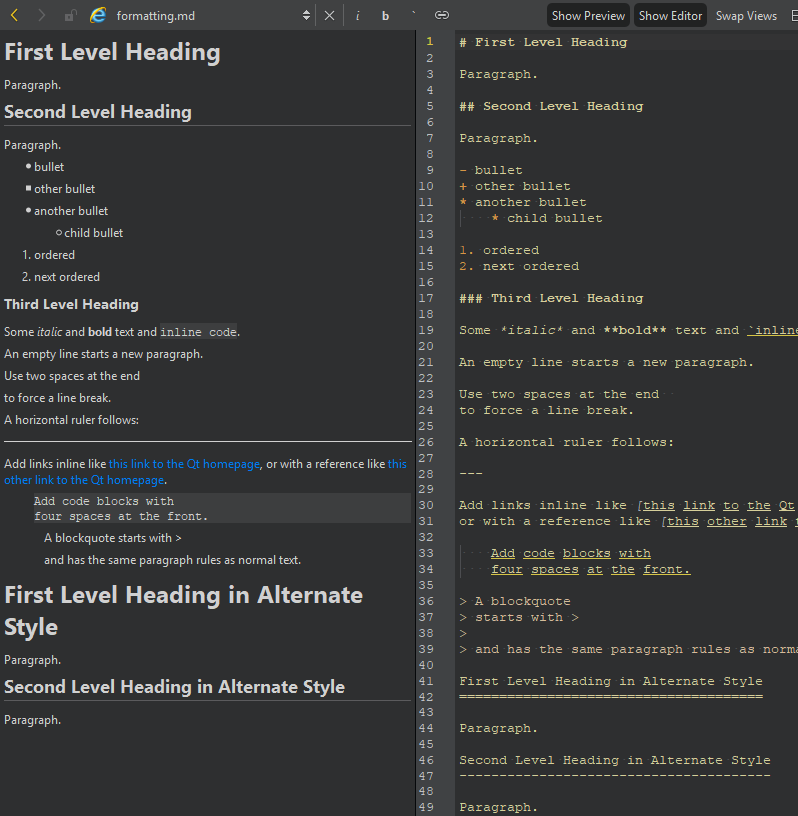
在编辑器中编辑文件时,您可以在预览中看到所做的更改。
要隐藏和显示视图,请选择“Show Preview ”和“Show Editor ”。要交换视图的位置,请选择“Swap Views ”。
格式化文本
使用编辑器工具栏上的按钮,可将文本格式化为斜体 (i)、粗体 (b) 或内联代码 (`),并创建指向网站的链接 ( )。
)。
跳转到行和列
行号和列号指示器显示有关当前光标位置的信息。选中它以激活定位器,然后输入行号和列号即可跳转至该位置。
访问网站链接
要在编辑器中点击网站链接:
- 将光标置于链接上。
- 然后,执行以下操作之一:
- 按住Ctrl 键并单击(在 macOS 上为按住Cmd 键并单击)。
- 按F2 键。
- 在上下文菜单中选择“Follow Symbol Under Cursor ”。
Copyright © The Qt Company Ltd. and other contributors. Documentation contributions included herein are the copyrights of their respective owners. The documentation provided herein is licensed under the terms of the GNU Free Documentation License version 1.3 as published by the Free Software Foundation. Qt and respective logos are trademarks of The Qt Company Ltd in Finland and/or other countries worldwide. All other trademarks are property of their respective owners.
