
下载语法高亮定义
Qt Creator 使用KSyntaxHighlighting语法高亮引擎,并采用 Kate 语法定义。它自带了大多数常用的 Kate 定义,您还可以下载更多定义。有关定义文件的更多信息,请参阅《使用语法高亮》。
语法定义文件中显式指定的字体属性(如粗体、斜体、下划线或删除线)将被应用。如果颜色在Qt Creator 主题下仍可读,则会应用相应颜色。
记住首选定义
如果您打开的待编辑文件有多个可用的语法高亮定义,编辑器会提示您选择要使用的定义。
要保存所选设置,请选择“Remember My Choice ”。
要重置已保存的定义,请转到“Preferences ” > “Text Editor ” > “Generic Highlighter ”,然后选择“Reset Remembered Definitions ”。
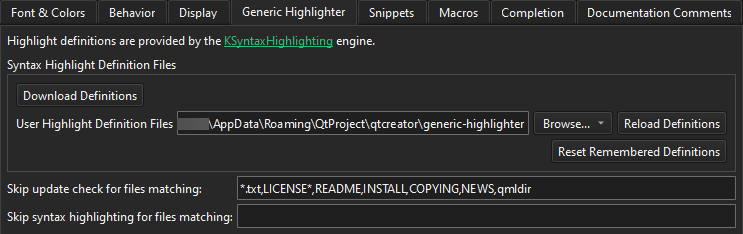
下载定义
如果编辑器无法为要打开编辑的文件找到高亮定义,系统会提示您下载额外的高亮定义文件。选择“Download Definitions ”以下载这些文件。
要查看已下载文件的相关信息,请打开“常规消息”视图。
忽略文件模式
若要抑制针对特定文件的下载提示,请转至“Preferences ” > “Text Editor ” > “Generic Highlighter ”,并在“Skip update check for files matching ”中添加以逗号分隔的通配符文件模式。
若要完全关闭特定文件的语法高亮功能,请将通配符文件模式添加到Skip syntax highlighting for files matching 中。
例如,若要跳过文本文件、许可证文件和 README 文件:*.txt, LICENSE*, README
添加自定义定义
如果您编写了自定义的语法定义文件,请在User Highlight Definition Files 中添加一个定义搜索路径。
要应用对定义文件所做的更改,请选择Reload Definitions 。
另请参阅 《操作指南:编辑代码》、《编辑代码》和《通用高亮器》。
Copyright © The Qt Company Ltd. and other contributors. Documentation contributions included herein are the copyrights of their respective owners. The documentation provided herein is licensed under the terms of the GNU Free Documentation License version 1.3 as published by the Free Software Foundation. Qt and respective logos are trademarks of The Qt Company Ltd in Finland and/or other countries worldwide. All other trademarks are property of their respective owners.
