
外设寄存器
“Peripheral Registers ”视图显示外围设备(如鼠标、键盘、显示器、打印机或USB驱动器)的当前状态。应用程序通过写入寄存器向设备发送信息,并通过读取寄存器从设备获取信息。要读取外围设备中的寄存器,应用程序需通过CPU发出的加载或存储指令访问其I/O地址。
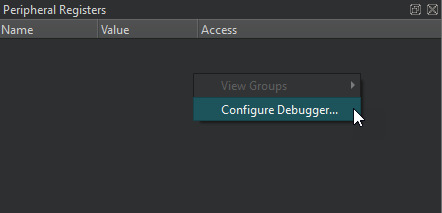
“Access ”列显示该寄存器的访问类型:读写(RW )、只读(RO )或只写(WO )。“N/A ”表示该访问类型不可用。
右键单击列标题可在视图中显示或隐藏列。
右键单击视图可选择以下操作:
- 查看寄存器组。
- 设置调试器首选项。
默认情况下,“Peripheral Registers ”视图处于隐藏状态。要显示该视图,请在调试器工具栏的“Views ”中选中它。
Copyright © The Qt Company Ltd. and other contributors. Documentation contributions included herein are the copyrights of their respective owners. The documentation provided herein is licensed under the terms of the GNU Free Documentation License version 1.3 as published by the Free Software Foundation. Qt and respective logos are trademarks of The Qt Company Ltd in Finland and/or other countries worldwide. All other trademarks are property of their respective owners.
