
CDB 路径
要获取用于调试 Windows 应用程序的操作系统库的调试信息,请将 Microsoft 符号服务器添加到调试器的符号搜索路径中:
- 转到“Preferences ” > “Debugger ” > “CDB Paths ”。
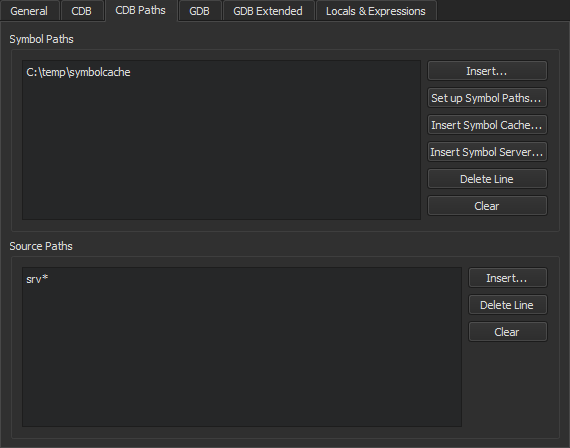
- 在“Symbol Paths ”组中,选择“Insert ”。
- 选择要存储缓存信息的目录。建议使用临时目录中的子文件夹,例如“
C:\temp\symbolcache”。 - 选择Apply 。
注意: 如果网络连接速度较慢,填充 缓存可能需要很长时间。
要使用源服务器基础设施直接从版本控制系统或 Web 上获取缺失的源文件,请在Source Paths 中输入以下字符串:srv* 。
Copyright © The Qt Company Ltd. and other contributors. Documentation contributions included herein are the copyrights of their respective owners. The documentation provided herein is licensed under the terms of the GNU Free Documentation License version 1.3 as published by the Free Software Foundation. Qt and respective logos are trademarks of The Qt Company Ltd in Finland and/or other countries worldwide. All other trademarks are property of their respective owners.
