
CDB
要设置用于管理 CDB 进程的偏好设置,请转至“Preferences ” > “Debugger ” > “CDB ”。
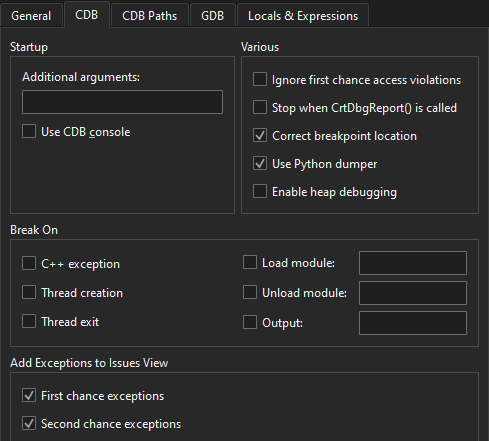
下表总结了这些首选项。
| 首选项 | 值 |
|---|---|
| Additional arguments | 启动 CDB 的附加参数。 |
| Use CDB console | 如果控制台应用程序无法在配置的控制台中正常启动,且随后的附加操作失败,请使用本机 CDB 控制台诊断问题。选中此复选框可覆盖 Windows 系统环境变量中设置的控制台。请注意,本机控制台在应用程序退出时不会显示提示。 |
| Ignore first chance access violations | 禁用访问违规异常的首次中断。第二次发生访问违规时,程序将中断并进入调试器。 |
| Stop when CrtDbgReport() is called | 在CrtDbgReport() 函数上自动添加断点,以捕获由assert() 等引起的运行时错误消息。 |
| Correct breakpoint location | CDB 允许在注释中或未生成代码的源代码行上设置断点。在这种情况下,断点将移至实际生成代码的下一行源代码。若要通过在源代码编辑器中移动断点标记来反映此类临时更改,请选中此复选框。有关详细信息,请参阅“设置断点”。 |
| Use Python dumper | 使用 Python Dumper 类的抽象层,在“Locals ”和“Expressions ”视图中生成数据项的描述。有关详细信息,请参阅“调试辅助程序的实现”。 |
| Enable heap debugging | 使用调试堆(而非普通堆)分配内存。调试堆包含有助于诊断堆相关错误的检查机制,但在被调试进程中分配内存时会对性能产生负面影响。 |
| Break On | 指定调试器是否应在以下情况下暂停:C++ 异常、线程创建或退出、加载或卸载指定的应用程序模块,或出现指定的输出。 |
| Add Exceptions to Issues View | 在“问题”中显示有关“首次机会”和“第二次机会”异常的信息。 |
Copyright © The Qt Company Ltd. and other contributors. Documentation contributions included herein are the copyrights of their respective owners. The documentation provided herein is licensed under the terms of the GNU Free Documentation License version 1.3 as published by the Free Software Foundation. Qt and respective logos are trademarks of The Qt Company Ltd in Finland and/or other countries worldwide. All other trademarks are property of their respective owners.
