
Autotools
借助 Autotools,您可以根据简单的指令创建一个可移植、完整且自包含的 GNU 构建系统。
Qt Creator Qt Creator 可以打开使用 Autotools 构建系统的项目。您可以直接从 构建并运行这些项目。
注意:请启用 AutotoolsProjectManager 插件才能使用它。
处理 Autotools 项目
要在Qt Creator 中处理您的 Autotools 项目:
- 选择“File ” > “Open Project ”。
- 从您的项目中选择
Makefile.am文件。这是使用 autotools 插件的唯一方式。 - 选择构建目录。目前仅支持源代码内构建。
- 选择Finish 。Qt Creator 将显示项目树结构。根节点显示项目名称。所有项目文件均列于其下方,您可以直接从列表中打开它们。
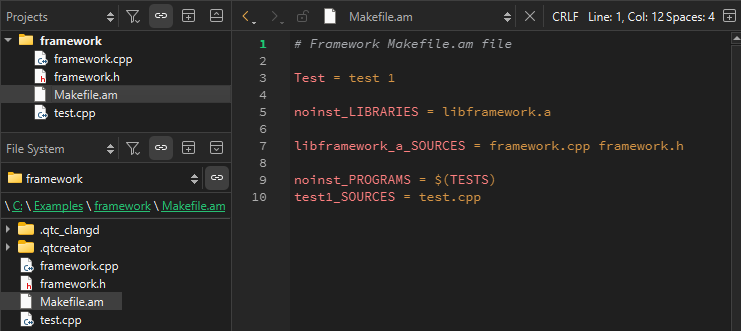
- 选择“
 ”(Run )以执行预定义的构建步骤(
autogen.sh或autoreconf、configure以及make)。首次运行应用程序时,必须选择可执行文件。
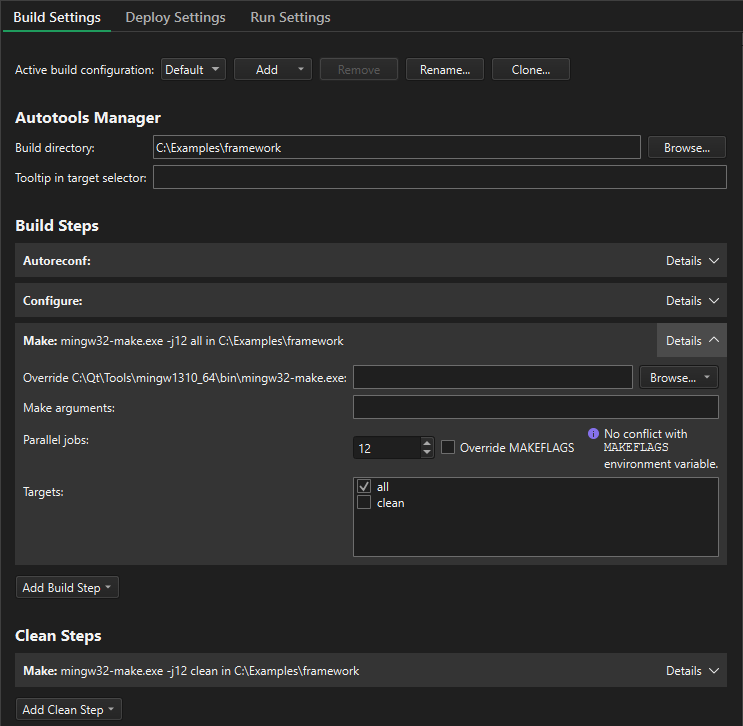
- 要查看和编辑 autotools 构建步骤,请选择“Projects ”>“Build Settings ”。
您可以向预定义的 autotools 构建步骤添加参数。
另请参阅 “启用和禁用插件”。
Copyright © The Qt Company Ltd. and other contributors. Documentation contributions included herein are the copyrights of their respective owners. The documentation provided herein is licensed under the terms of the GNU Free Documentation License version 1.3 as published by the Free Software Foundation. Qt and respective logos are trademarks of The Qt Company Ltd in Finland and/or other countries worldwide. All other trademarks are property of their respective owners.
